
Court rules
CaseFlow can compute key deadlines automatically from a trigger date and a court rule. Pick a jurisdiction, pick a rule (such as "Answer to Complaint" under FRCP), pick the trigger event, and CaseFlow calculates the resulting deadline date. When the trigger date later moves, CaseFlow offers to recompute every downstream deadline that depends on it.
This is optional. Every key deadline can still be hand-set as before; the court-rules section only appears on the milestone modal when your firm enables the feature on a matter.
Plan requirement
Court rules are available on the Multi-Practice plan only.
What ships out of the box
CaseFlow includes a starter pack of rules across six jurisdictions:
- U.S. Federal Civil (FRCP)
- New York Supreme Court (CPLR)
- California Superior Court (CCP)
- Texas District Court (TRCP)
- Florida Circuit Court (Fla. R. Civ. P.)
- Delaware Chancery Court
Each jurisdiction has the most common civil-litigation deadline rules already encoded (response windows, discovery cutoffs, motion-response windows, and similar). The list is fixed at launch; firm-defined custom rules are a post-launch feature.
Computing a deadline from a rule
Open a matter and click the Key Deadlines tab. Click New Key Deadline. The standard deadline form opens.
Below the description field, you will see a Compute from court rule section.
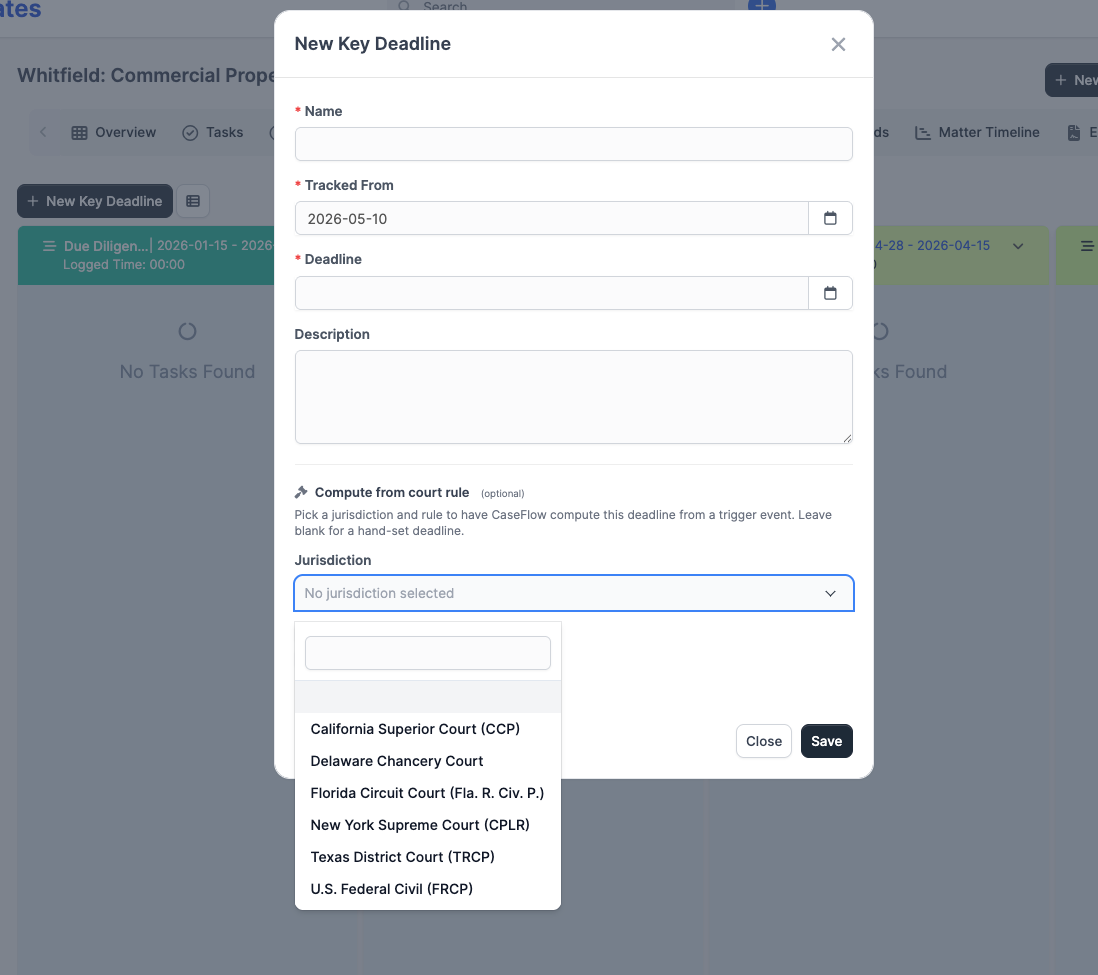
Fill in the section in this order:
- Jurisdiction: Pick the court whose rules apply (for example, U.S. Federal Civil for federal litigation in any district).
- Rule: After picking a jurisdiction, the Rule dropdown unlocks with the rules CaseFlow has for that court. Pick the one that matches what you are computing (for example, "Answer to Complaint").
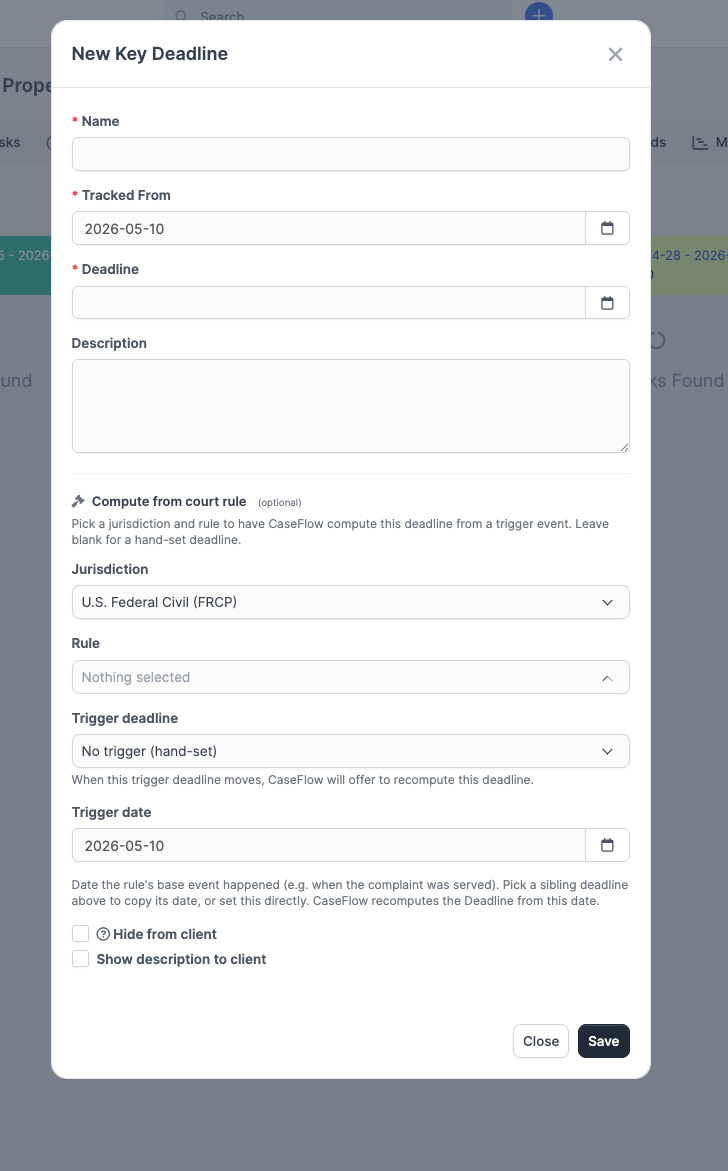
- Trigger source: Pick how the rule's start date is set:
- Trigger deadline: Bind to a sibling key deadline on the same matter. When that sibling moves, CaseFlow offers to recompute this one. Example: bind "Answer to Complaint" to the "Service of Complaint" deadline.
- No trigger (hand-set): Type a specific date into the Trigger date field that appears.
- CaseFlow computes the resulting Deadline date and shows it in a green confirmation box below the section.
Click Save to create the deadline.
If CaseFlow cannot compute the deadline (for instance, the trigger date is missing or the rule cannot be applied to the chosen inputs), an amber error box appears. Either fix the trigger inputs or fill the Deadline field by hand.
How the math works
The local rules engine handles:
- Calendar-day counting: every rule in the v1 starter pack counts calendar days, not business days. Weekends and (where applicable) holidays are excluded only from the rolled-forward end date, not from the count itself.
- Federal holiday exclusions: federal civil rules (FRCP) use the published U.S. federal holiday list to roll a deadline forward when the computed date lands on a federal holiday. State-court rules in the v1 starter pack do not currently exclude state-specific holidays; if your matter is sensitive to state holiday timing, double-check the computed date by hand.
- Weekend rollover: when a computed deadline lands on a Saturday or Sunday, FRCP-style rules roll forward to the next business day. Other jurisdictions follow their own end-rolling logic where applicable.
The exact arithmetic for each rule is encoded in the rule itself. CaseFlow does not "interpret" the rule text; it applies the encoded parameters.
Business-day counting (where the count itself excludes weekends and holidays, not just the rolled-forward end date) and full state-court holiday calendars are on the roadmap. Until they ship, treat the computed date for state-court deadlines as a starting point you confirm against the rule text, not a final answer.
Cascade recomputation
When you change a deadline that other deadlines depend on, CaseFlow shows a Recompute downstream deadlines? preview before saving.
The preview lists each downstream deadline with three columns:
- The deadline name and rule
- Its current date
- The recomputed date if you accept
You can apply the recomputation, dismiss it (keep the current dates), or close the modal and edit the trigger by hand without affecting the downstream chain.
Protected deadlines
If any downstream deadline is in a protected category (Court Date, Hearing, Deposition, Filing Deadline, or Statute of Limitations), the preview surfaces them in a separate group with a confirmation checkbox:
You cannot apply the cascade until you tick that box. This is a deliberate friction point. A computed deadline shift on a Statute of Limitations is the kind of error that ends careers and matters; CaseFlow makes you say "yes, I looked" before the date changes.
What if my jurisdiction is not in the starter pack?
The starter pack covers the most common federal and state-court litigation jurisdictions in the U.S. If your firm needs a court that is not on the list (for example, a niche specialty court or a foreign jurisdiction), you have two options today:
- Pick the closest jurisdiction whose rules behave the same way (for example, FRCP for many federal deadlines outside the starter pack).
- Hand-set the deadline without using a rule.
Firm-defined custom rules and a vendor-provided rule feed (CalendarRules, Compulaw) are on the roadmap. Contact your CaseFlow partner if you need to discuss timeline.
Plan availability
Plan requirement
Court rules are available on the Multi-Practice plan only. The 14-day trial does not include this feature.
Next steps
- Key deadlines - The deadline form itself, where the Compute from court rule section lives
- Calendar overview - The firm-wide calendar that displays computed deadlines