
Disbursement reports
CaseFlow has two reports for disbursements (you may occasionally still see the older label "Expenses"). One is a per-category, per-month spending matrix. The other is a simple disbursements-vs-income chart.
Disbursements report
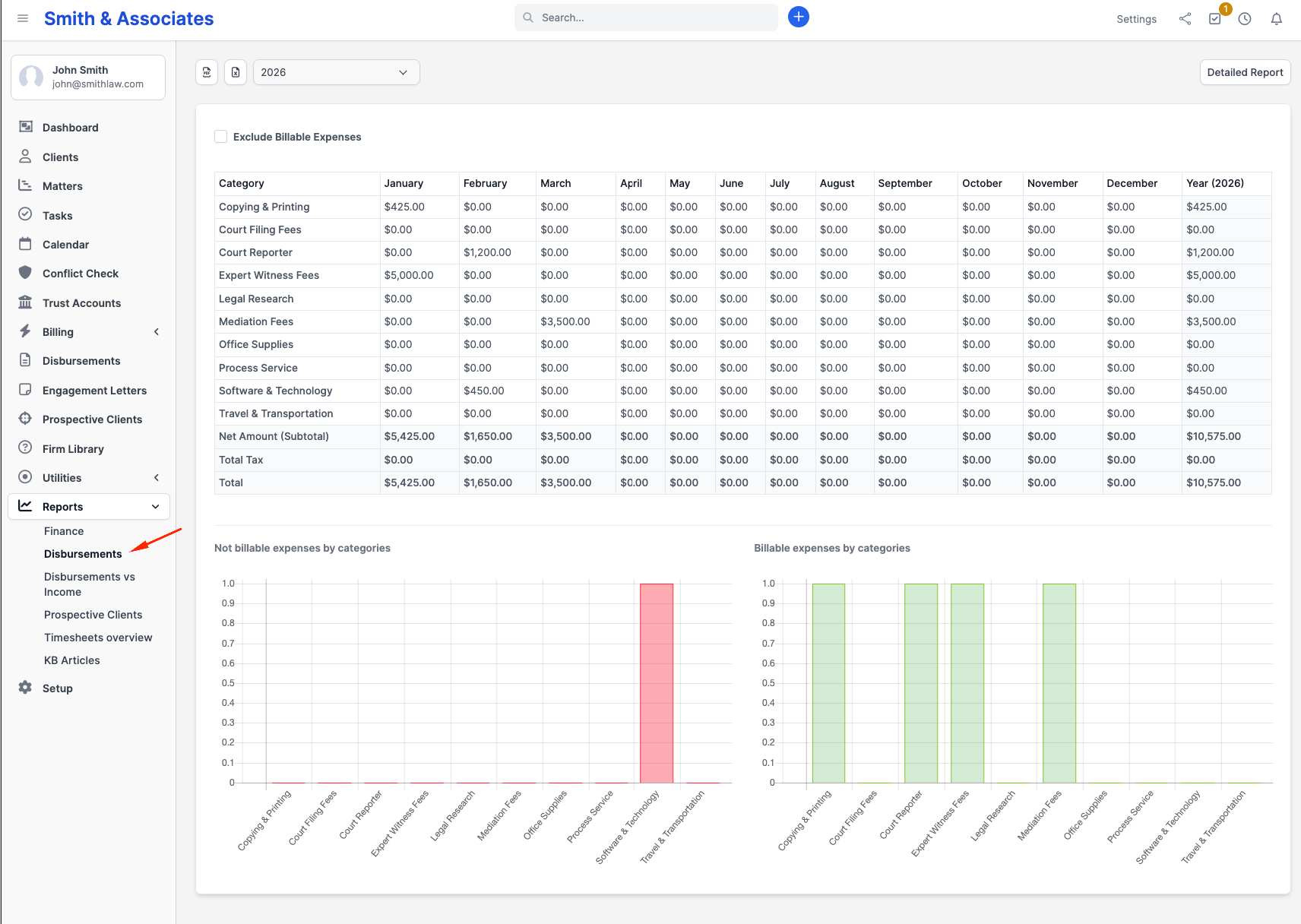
Go to Reports > Disbursements. The default view is a matrix:
- Rows: every disbursement category configured at Setup > Finance > Disbursement Categories
- Columns: the 12 months of the selected year
- Cells: the total amount for that category in that month
- Right column: the year total per category
- Bottom row: monthly column totals plus a grand total for the year
Filters
A small filter row sits above the matrix:
| Filter | Notes |
|---|---|
| Year | Defaults to the current year; the dropdown lists every year that has at least one disbursement on file |
| Currency | Only shown if the firm has disbursements in more than one currency; defaults to base currency |
| Exclude billable | Checkbox; when ticked, the matrix recomputes without billable disbursements (so you see firm-absorbed spend only) |
Changing any filter refetches the matrix immediately.
Detailed report
The matrix is a summary view. For the row-by-row underlying list, click Detailed report at the top right. The detailed view is a table with one row per disbursement, columns for category, amount, name, tax 1, tax 2, total tax, total with tax, currency, payment mode, date, client, matter, and reference. Each column supports search and sort.
Use Go back to return to the matrix view.
Export
The matrix view exposes Excel and PDF download buttons.
The detailed view offers Print, CSV, Excel, and PDF buttons once you reveal them via the table's column visibility toggle.
In Internet Explorer the matrix export buttons render disabled with a "Exporting not supported in IE" note. Every modern browser is fine.
Disbursements vs Income report
Go to Reports > Disbursements vs Income. The page is a single grouped bar chart with two series per month - disbursements and income - for the selected year. Amounts are always shown in the firm's base currency; the page banners the message "Amounts are displayed in the base currency."
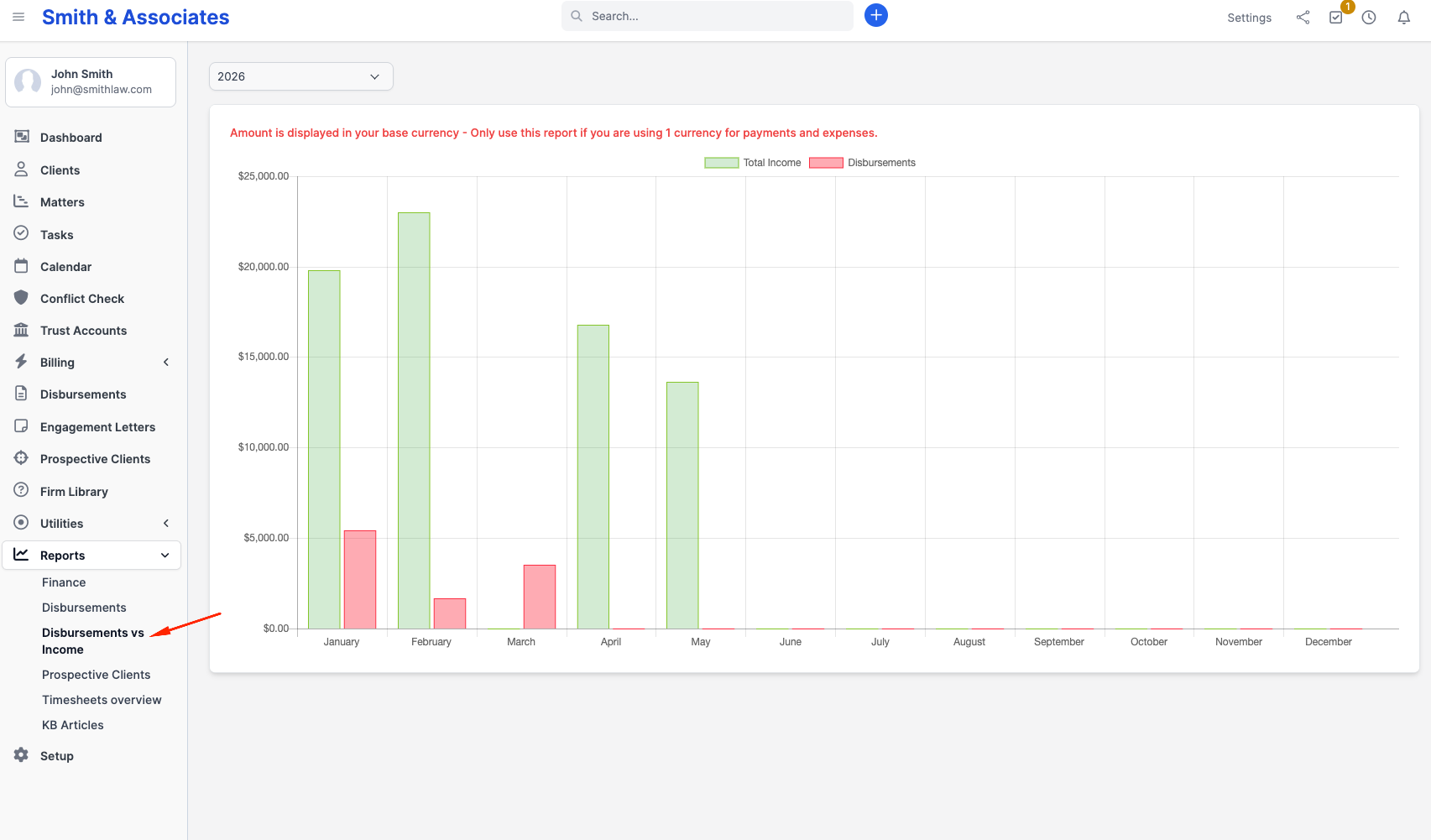
The only filter is a Year selector (visible when the firm has data outside the current year).
There is no export from this view; take a screenshot or capture the underlying data via the Disbursements matrix above.
Common uses
- Tax preparation - export the detailed Disbursements report as CSV or Excel and hand it to your accountant.
- Billing follow-up - filter the matter's disbursement list to billable + uninvoiced to surface anything that should be on the next invoice. The reports above are summary-oriented; for actionable per-disbursement work, use the Disbursements sidebar entry (not Reports).
- Budget tracking - the matrix view by category shows month-over-month trends per category in a single screen.
- Matter profitability - the built-in reports do not break disbursements down per matter. To compare matter spend against matter revenue, open the per-matter disbursement and invoice lists from the matter itself.
Plan availability
Both Disbursement reports are available on every plan. Visibility follows the staff member's View capability on the Reports module.