
Trust audit trail
Available on every plan
The trust audit log is required by bar rules in every U.S. jurisdiction and is therefore included on every CaseFlow plan, including the Solo trial. CaseFlow does not gate trust-account compliance behind a subscription tier.
What this is
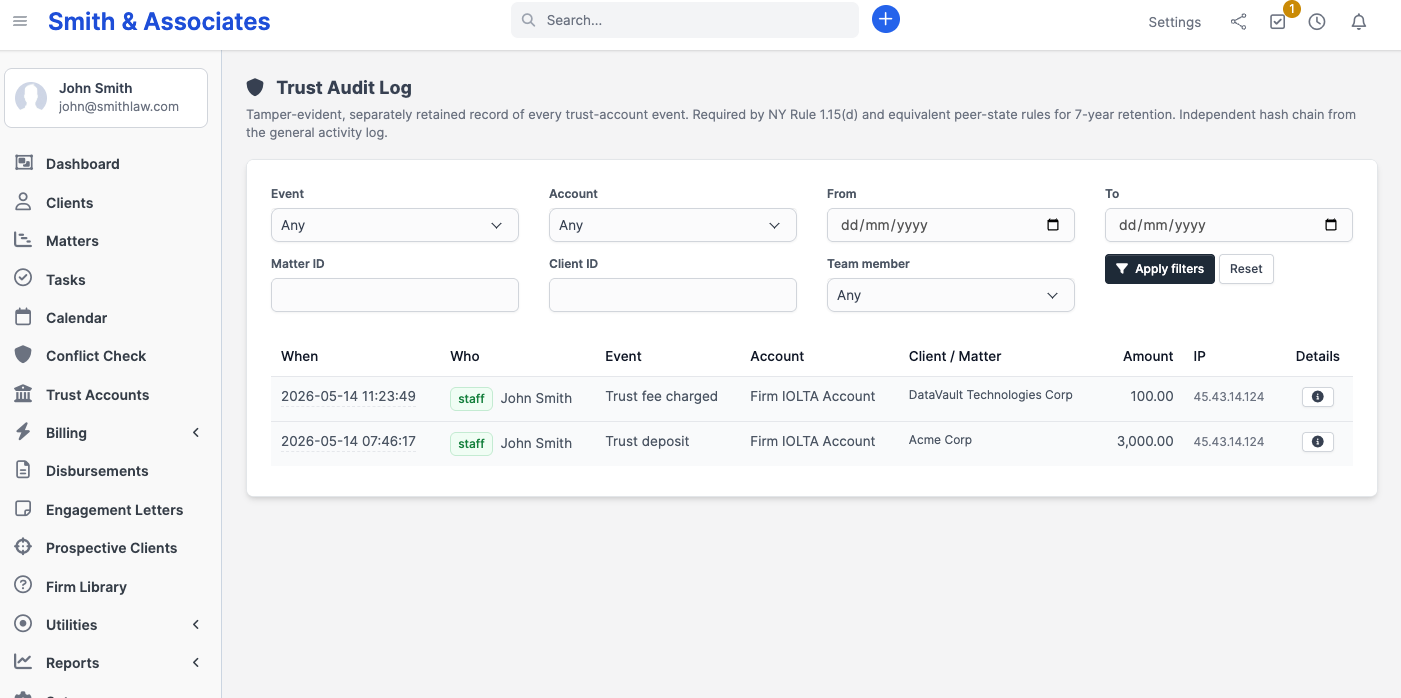
The trust audit trail is a separate, dedicated record of every action that affects a trust account. It is distinct from the general firm-wide activity log and is never pruned, merged, or deleted by any retention policy. Every deposit, disbursement, transfer, reconciliation, and account change generates an immutable entry with a full record of who acted, when, from what IP address, and what changed.
Each U.S. state bar requires a firm to maintain complete trust-account records and make them available for examination. ABA Model Rule 1.15(d) and the American Bar Association's Client Trust Account Records Rule 1 mandate retention of all transaction records. Specific state rules reinforce this requirement with explicit time horizons: New York DR 1.15(d) requires five years; California Rule 4-100 requires five years; Texas Rule 1.14 requires five years; several states including New York (under current guidance) and those with IOLTA program rules expect seven years. CaseFlow retains trust-audit entries for seven years on every plan, meeting the most demanding state-bar standard regardless of the firm's subscription tier.
Why it is separate from the general activity log
Trust events have stricter retention requirements, a narrower access control model, and a distinct compliance audience than general firm activity. If trust records were stored alongside general activity entries, a retention policy that shortens the general log window could silently remove bar-mandatory data. By maintaining a fully separate record, CaseFlow keeps the two stores from ever interfering with each other: the general log can be configured for a shorter retention window without any risk of touching trust records. Both records exist side by side, carry independent tamper-evidence chains, and cover their respective surfaces completely.
Where to find it
Open Trust Accounts from the sidebar. At the top of the dashboard, click the Trust Audit Log button (next to the + New account button).
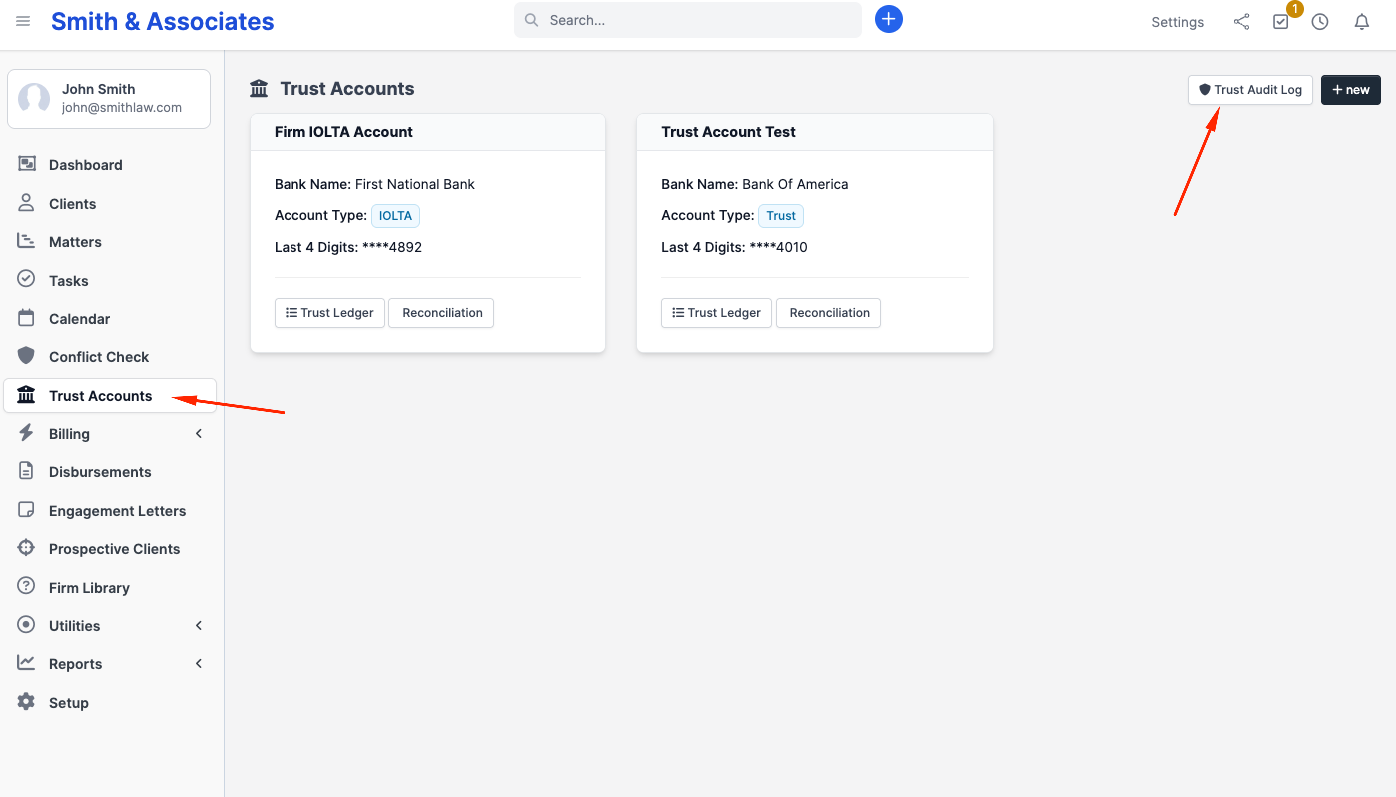
The viewer is restricted to firm administrators. Paralegals and other staff with trust-create permission can post entries that the log records, but they cannot open the viewer. This mirrors the bar's expectation that trust records are under the supervising attorney's or administrator's control.
Columns
| Column | What it shows |
|---|---|
| When | Date and time the event occurred, displayed in the firm's local timezone |
| Who | The staff member, contact, or system process that triggered the event, with a role label |
| Event | A plain-English label for the event type (for example, "Deposit posted" or "Reconciliation completed") |
| Account | The trust account name the event affects |
| Client / Matter | The associated client and matter, when the event is linked to one |
| Amount | The transaction amount with currency symbol; blank for non-financial events such as account configuration changes |
| IP | The originating IP address of the action |
| Details | An expandable view of the structured change record for events that carry before/after data |
Filters
The viewer includes seven filters that can be combined freely:
| Filter | Purpose |
|---|---|
| Event | Limit the list to a single category, such as all disbursements or all reconciliations |
| Account | Restrict to a specific trust account within the firm |
| From / To | Narrow to a date range; useful for producing records covering a specific audit period |
| Matter ID | Show only events linked to a particular matter |
| Client ID | Show only events linked to a particular client |
| Team member | Filter by the staff member who recorded the entries; the dropdown shows only staff who have actually written a trust-audit row |
What is logged (event taxonomy)
Every event type in the table below generates a separate, immutable row in the trust audit trail.
| Event | When it is recorded and what it captures |
|---|---|
| Account opened | A new trust account is created. Captures the account name, bank name, account number, and IOLTA designation. |
| Account updated | The account's name, bank, account number, or IOLTA flag is changed. Captures the before and after values of each changed field. |
| Account deactivated | An account is closed or taken out of active service. Records who deactivated it and when. |
| Account reactivated | A previously closed account is returned to active service. Records who reactivated it and when. |
| Deposit posted | Client funds are received into the trust account. Captures the amount, currency, client, matter, and transaction reference. |
| Disbursement issued | Funds are paid out of the trust account. Captures the amount, currency, payee, client, matter, and transaction reference. |
| Entry reversed | An administrator reverses a mistaken deposit or disbursement. Recorded as the opposite entry, a deposit for a disbursement or a disbursement for a deposit, that names the entry it reverses and its reference. If the disbursement paid an invoice, it also captures the whole removed payment, its note included, and whether the invoice's overdue reminders were paused. |
| Transfer posted | Funds are moved to the operating account or to an external payee. Captures the amount, currency, destination, client, and matter. The destination payee field is required by bar rules to answer where trust funds went. |
| Interest credit posted | Interest or IOLTA bar-foundation accrual is credited to the account. Captures the amount, currency, and client if the credit is attributable to a specific matter. |
| Bank fee debited | A bank service charge is posted. Captures the amount, currency, and client if the fee is attributable to a specific matter. |
| Attempted reversal of an entry refused | An administrator tried to reverse an entry and CaseFlow refused, because the entry is itself a reversal, has already been reversed, or cannot be reversed (a transfer, interest or a fee). Names the entry and the reason. Nothing is posted. |
| Overdraft attempt blocked | A transaction was submitted that would have overdrawn the trust account and was rejected by CaseFlow before posting. See the subsection below for details. |
| Transaction edited | An administrator corrects the reference, description, check number, or payee on an existing transaction. Captures the field, the value before, the value after, the administrator, and when. The amount, transaction type, client, matter, and trust account cannot be edited and never appear in this row. |
| Reconciliation completed | A three-way reconciliation is completed. Records the reconciling administrator, the account, and the reconciliation date. |
| Reconciliation reviewed | An administrator opens and reviews the reconciliation page. Recorded at most once per administrator per five-minute window to prevent log noise from repeated page loads. |
| Statement generated | A trust account statement PDF is produced. Records who generated it, the account, and the date range covered. |
| Statement emailed | A trust account statement PDF is emailed to a client. Records who sent it, the recipient client, and the account. |
| Trust audit log exported | An administrator downloads a self-contained export bundle of the audit log. Records the filter scope, the row count, how many entries its gaps stand for, the first and last row id covered, the first and last row hash, and the bundle's SHA-256 fingerprint. |
Overdraft attempts
CaseFlow refuses any transaction that would overdraw a trust account. When a withdrawal is attempted for more than the available balance, the transaction is rolled back and the attempt is recorded in the trust audit trail before any funds move. A refused reversal of a deposit is recorded the same way, naming the deposit it would have reversed. This means the audit trail contains a complete record of both successful transactions and rejected attempts.
Bar examiners look for overdraft attempts because they can indicate billing disputes, clerical errors, or unauthorized disbursement attempts that a firm must be able to account for. Because CaseFlow records the attempt regardless of outcome, a firm can demonstrate to a bar examiner not only what happened but also what was prevented and who submitted the request.
Exporting the audit log
Firm administrators can produce a self-contained export bundle of the trust audit log to share with a bar examiner, an outside auditor, an opposing-counsel discovery request, or to retain after a CaseFlow subscription ends. Open the Trust Audit Log viewer, apply any filters that scope the request (event type, account, client, matter, team member, date range), and click Export bundle.
The download is a single ZIP archive containing five files:
| File | What it is for |
|---|---|
cover_sheet.pdf | A signed certification of the export under Federal Rule of Evidence 902(13) (FRE 902(13)). Names the firm, the generating administrator, the software version, the filter scope, the row count, the rows left out, and the first and last row hash, and, when entries are left out, says which rows the bundle proves. Designed to satisfy the "certified records of an electronic process" path to self-authentication. |
trust_audit_log.csv | One row per audit event, in chain order, with every column. The first columns are the canonical fields the row hash was computed from. The prev_hash and row_hash columns close out the chain. Trailing account_name, client_name, matter_name columns are joined in for readability and are explicitly outside the hash chain. A filtered export also carries gaps, each marked in the last column, link_only, with the number of entries it stands for: see below. |
hash_chain_spec.json | The cryptographic specification for the hash chain. Names the algorithm (SHA-256), the field order, the length-prefixed canonical encoding, and the genesis sentinel. An auditor with no CaseFlow source code can re-verify the chain from this file plus the CSV. |
verifier.php | A small, self-contained PHP 8 script that reads the CSV in the same directory, recomputes the hash of every row shown in full, checks every link, including the two ends of each gap, the columns and the last row hash, and exits with status 0 only if all of it verifies. No CaseFlow dependencies; the script runs anywhere PHP is installed. |
README.txt | Plain-text orientation for the recipient. Describes the bundle contents, the purpose of each file, and how to run the verifier. |
What a filtered export proves. Your firm's trust audit trail is one chain across all of its trust accounts, so an export filtered by account, client, matter, team member or event type has other entries in between its own. Each run of those appears as a single gap: the id it starts at, how many entries it stands for, and the two hashes that join it to the entries on either side, with none of their contents. An examiner of one account sees no other account's or client's details, only that other entries exist, how many and where. The verifier recomputes every entry shown in full, but it cannot recompute a gap, so a gap could hide a change to any entry before it. A filtered export on its own therefore proves only the entries after its last gap, and the verifier's last line says how many. To prove every entry end to end, and to tie the entries to the daily checkpoint, export with no filter other than a date range: every entry in the filtered export appears there with the same id and row_hash, and, when the date range runs to the day after the filtered bundle was exported, the filtered bundle's own SHA-256 fingerprint appears on its Trust audit log exported entry, which shows the bundle is exactly the one the firm issued. Give the ZIP exactly as downloaded: unzipping and re-zipping it changes its fingerprint. Check that that export's own verifier says "chain intact".
The export is admin-only. Every export is itself recorded in the trust audit log as a Trust audit log exported event, capturing the administrator who generated it, the filter scope, the row count, how many entries its gaps stand for, the first and last row id covered, and the bundle's SHA-256 fingerprint, so the firm can always show which bundle it issued. A bar examiner reviewing an export can therefore see the prior history of exports in the same log without needing a separate report.
The export is unbounded: the viewer caps to 500 rows for forensic readability, but the bundle always contains every row matching the filter scope. If a single export would be unusably large for a downstream tool, narrow the date range and run a series of contiguous exports. Each bundle verifies on its own, with its own verifier, so keep them as separate bundles rather than joining their CSVs. A bundle exported before a CaseFlow update carries the verifier it was made with. One exported before gaps existed, with any filter other than a date range, may report BROKEN because of how it was exported. Export the same scope again: the new bundle's verifier says whether those entries verify.
Retention and access
Trust-audit entries are retained for seven years on every plan. There is no UI control, administrator function, or API endpoint that can delete or edit a recorded entry. This applies equally to firm administrators, paralegals, and CaseFlow support staff. The retention period and the no-deletion guarantee hold regardless of whether the trust account the entry references has since been closed or deactivated.
Each firm's trust-audit records are held in an isolated store. No other firm's entries ever appear in your records, and your entries cannot be accessed from another firm's account.
Learn more
- Audit log — the general firm-wide audit log covering sign-in, matter, client, and billing activity
- Daily checkpoints: RFC 3161 third-party timestamp certificates on this trust chain, on any plan that includes the monthly close, and on the activity-log chain on Multi-Practice, the Trust Close plan and the free trial
- Setting up trust accounts — configuring IOLTA and operating trust accounts before posting transactions