
Billable disbursements
A billable disbursement is a firm-paid cost that you intend to recover from the client on an invoice. The firm pays upfront; the invoice line passes the amount through.
Marking a disbursement as billable
A disbursement is billable when:
- It has a Customer assigned, and
- The Billable checkbox on the form is ticked.
The Billable checkbox is hidden until you pick a customer, and locks (with a tooltip) once the disbursement has been added to an invoice.
Adding billable disbursements to an invoice
There are two paths.
From the invoice form (multi-select)
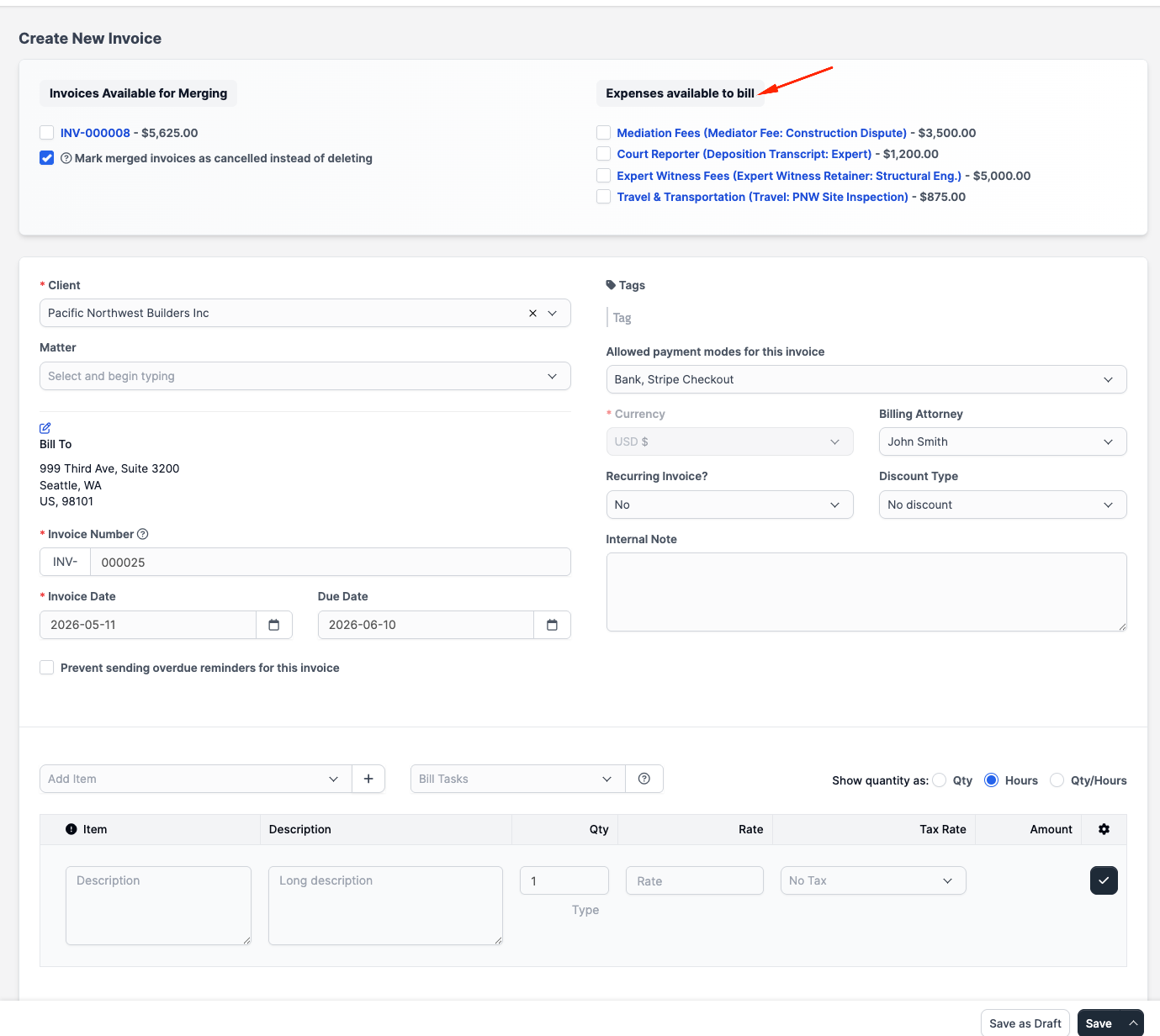
When you create or open an invoice for a client, the right-hand side of the invoice editor shows an Expenses available to bill panel listing every uninvoiced billable disbursement for that client.
For each row you can:
- Tick the box to add the disbursement as a line item.
- Click the row's popover to optionally include the disbursement's Note and/or Name in the invoice-line description (useful when the category alone isn't descriptive enough).
Saving the invoice adds the ticked disbursements as line items. Each line shows:
- The category as the description prefix
- The disbursement Name in parentheses, if you have one
- The amount in the disbursement's currency
- Any Tax 1 / Tax 2 carried over from the disbursement
From a single disbursement (Convert to Invoice)
Open a disbursement that's billable and not yet invoiced. The detail page shows a Convert to Invoice button at the top right. Clicking it opens a small helper modal that creates a new invoice with this single disbursement pre-loaded as a line item. After conversion the button is replaced with a link to the new invoice.
Use Convert when you want one invoice per disbursement (e.g. a single court filing fee billed immediately). Use the multi-select approach when you want to bundle several disbursements onto a single invoice.
After billing
Once a disbursement is on an invoice:
- The disbursement record links back to the invoice — the detail page shows the invoice number as a button next to the action area.
- The Billable checkbox locks; you cannot toggle the disbursement back to non-billable.
- The disbursement cannot be deleted until you remove it from the invoice (or void/delete the invoice).
- The disbursement record will not show up in Expenses available to bill for future invoices.
If you delete the linked invoice (or it is voided), the disbursement returns to the uninvoiced state and is available to bill again.
Markup
CaseFlow does not have a built-in markup field on disbursements. The amount you record is the amount that goes onto the invoice.
If your firm marks up a category (e.g. copying at $0.25/page when actual cost is $0.05/page), record the disbursement at the marked-up amount and track the firm's true cost separately. Tax fields apply to the recorded amount, not to a hidden cost.
Reporting
Reports > Disbursements shows totals by category, client, and date range, with the same billable / non-billable and invoiced / uninvoiced cuts. Reports > Expenses vs Income compares total disbursements against invoice payments for a chosen period.