
Audit log
CaseFlow records security-relevant events to a tamper-evident audit log on every plan. This page describes what is recorded, how long it is kept, and how you or your IT team can export it or feed it into your security tools.
Quick answer for InfoSec questionnaires
CaseFlow's audit log cannot be altered or deleted after the fact. Trust-account events are kept for seven years on every plan. General events are kept for a configurable window. The log can be exported as CSV or as a tamper-sealed digital file, and it can be forwarded in real time to your firm's security platform (Splunk, Datadog, Microsoft Sentinel, Elastic, and similar). Each firm's audit log is held in its own isolated database, so no other firm's activity ever appears in your records.
What we log
Logging is always on across every plan. Plans differ in how long events are kept, who can view them, and what export and integration tools are available, not in what gets captured.
| Category | Examples |
|---|---|
| Sign-in activity | Successful and failed logins, two-factor challenges, password resets, password changes, changes to two-step sign-in, CaseFlow support sessions |
| Access control | Role assignments, permission changes, staff invites and deactivations |
| Matter activity | Matter created, edited, status changed, assigned, closed, or deleted |
| Client activity | Client created or edited, contacts added, portal access toggled |
| Document activity | Documents uploaded, replaced, shared with the client portal, or deleted |
| Billing activity | Invoices, estimates, proposals, payments, refunds, created, sent, paid, voided |
| Trust accounting | Trust accounts opened or closed; deposits, disbursements, transfers, reconciliations, statements sent |
| Administrative | Settings, firm configuration, plan changes, API keys |
| Audit hygiene | Retention policy changes, audit exports, and any attempt to clear the log itself |
Sign-in entries record the originating IP address of the client device, not the IP of any CDN edge or reverse proxy that the request passed through. This matters for any firm receiving traffic through Cloudflare, Akamai, or a similar service; the address recorded is the one your security team needs.
While CaseFlow support is signed in to your workspace, it signs in as your firm's first administrator, but everything it does, in this log and in the trust-account audit, is recorded as CaseFlow Support followed by that administrator's name, never as the administrator alone. An export or proof bundle it downloads names CaseFlow Support too. A support session cannot create, revoke, or switch an API key; buy or change your plan, seats, or trust accounts, or open the payment portal; connect your Stripe payments account or open its dashboard; add, deactivate, reactivate or delete a team member, or change anyone's profile; delete a client, or switch one on or off; add, edit, import, delete, or switch on or off a client contact, change their portal access, confirm a client's portal registration, or sign in to the portal as a client; connect a calendar; change the two-step or automatic sign-out settings; or change where your log is forwarded.
For each event we record who did it (staff member, client contact, CaseFlow support, or the system itself), what they did, what record was affected, the originating IP address and device, the precise time, and for changes, what the value was before and after.
Retention by plan
Trust-account events are kept for seven years on every plan, in line with the requirements of the New York Rules of Professional Conduct Rule 1.15 and equivalent rules in California, Texas, Illinois, Florida, and other states. General activity is kept on a plan-tiered schedule.
| Solo | Growth | Multi-Practice | |
|---|---|---|---|
| Trust-event retention | 7 years | 7 years | 7 years |
| General-event retention | 90 days | 12 months | 7 years |
| Firm-wide activity log viewer | — | ✓ (12-month window) | ✓ (full retention) |
| Per-matter audit trail tab | — | ✓ | ✓ |
| CSV export | Trust only | All | All |
| Tamper-sealed digital export | — | — | ✓ |
| Real-time security-platform streaming | — | ✓ | ✓ |
| Independently certified daily timestamps | — | — | ✓ |
Within these windows, the audit log's cryptographic chain protects historical entries from deletion: removing a middle entry would break every seal that follows it, which is why trust events and chain-bearing entries are never trimmed by retention policies. Retention applies only to legacy entries written before the chain was introduced.
This follows the same approach used by major cloud platforms (AWS, Microsoft Azure, Google Cloud): events are always captured; long retention and reporting tools are tiered. Your obligation to your clients under the rules of professional conduct does not change with your subscription tier, and neither does our underlying logging.
Trust-account audit (separate, isolated record)
Trust events are written to a dedicated, isolated record that is never automatically deleted, has its own access control (firm administrators and designated bookkeepers only), and continues to exist even if the originating trust account is closed. This satisfies New York Rule 1.15(d), the American Bar Association's Model Rules on Client Trust Account Records, and equivalent state-bar requirements that require five-to-seven-year retention of every deposit, withdrawal, transfer, and reconciliation.
Each entry captures the trust account, transaction reference, matter, client, amount, currency, who made the change, originating IP, and a full record of what changed.
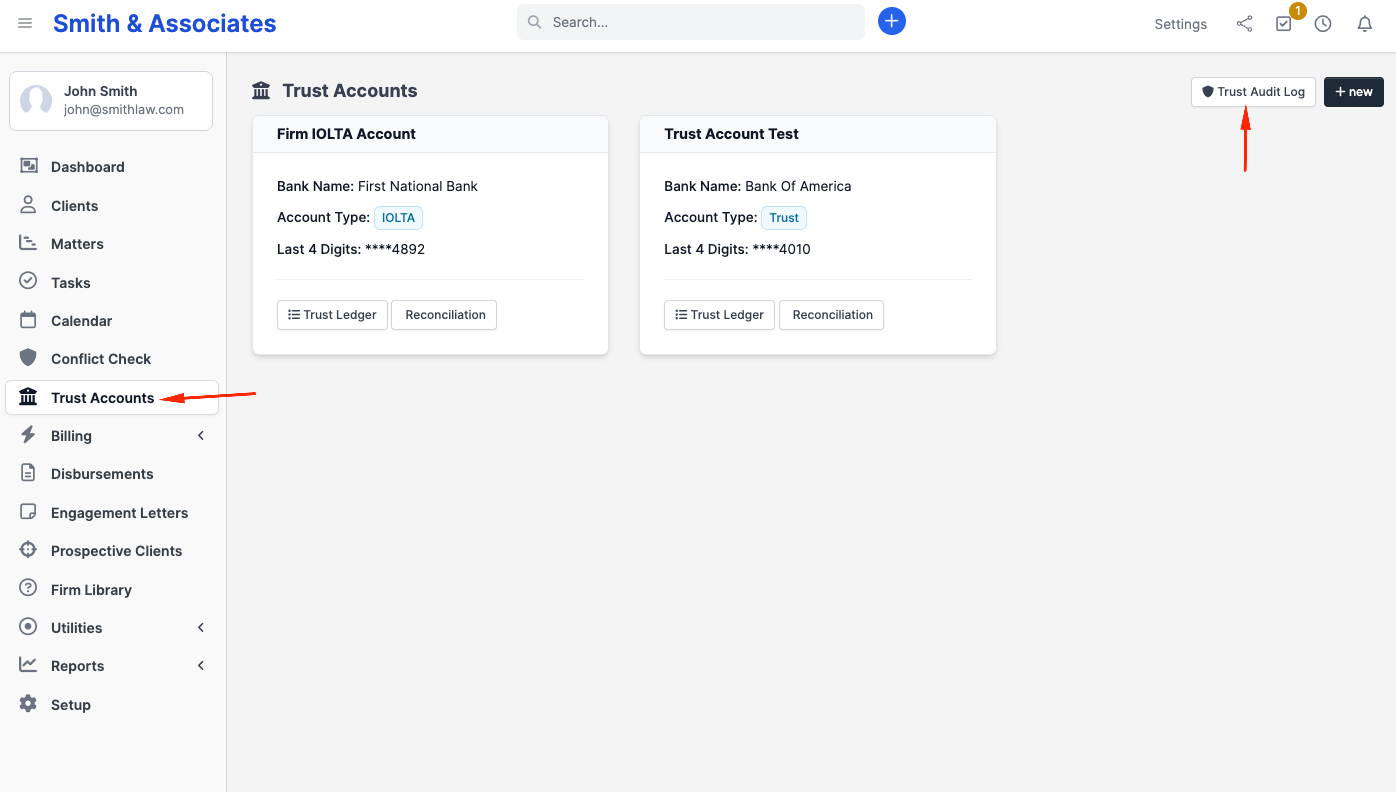
Firm administrators access the trust audit log from the Trust Accounts page, by clicking the Trust Audit Log button at the top of the dashboard. Paralegals and other staff with trust-create permission can post entries that the log records but cannot open the viewer; this matches the bar's expectation that trust records are under the supervising attorney's or administrator's control.
Learn more
See Trust audit trail for the complete list of trust events captured, the seven filter controls, retention guarantees, and how the viewer differs from the general activity log.
Per-matter audit trail (Growth and Multi-Practice)
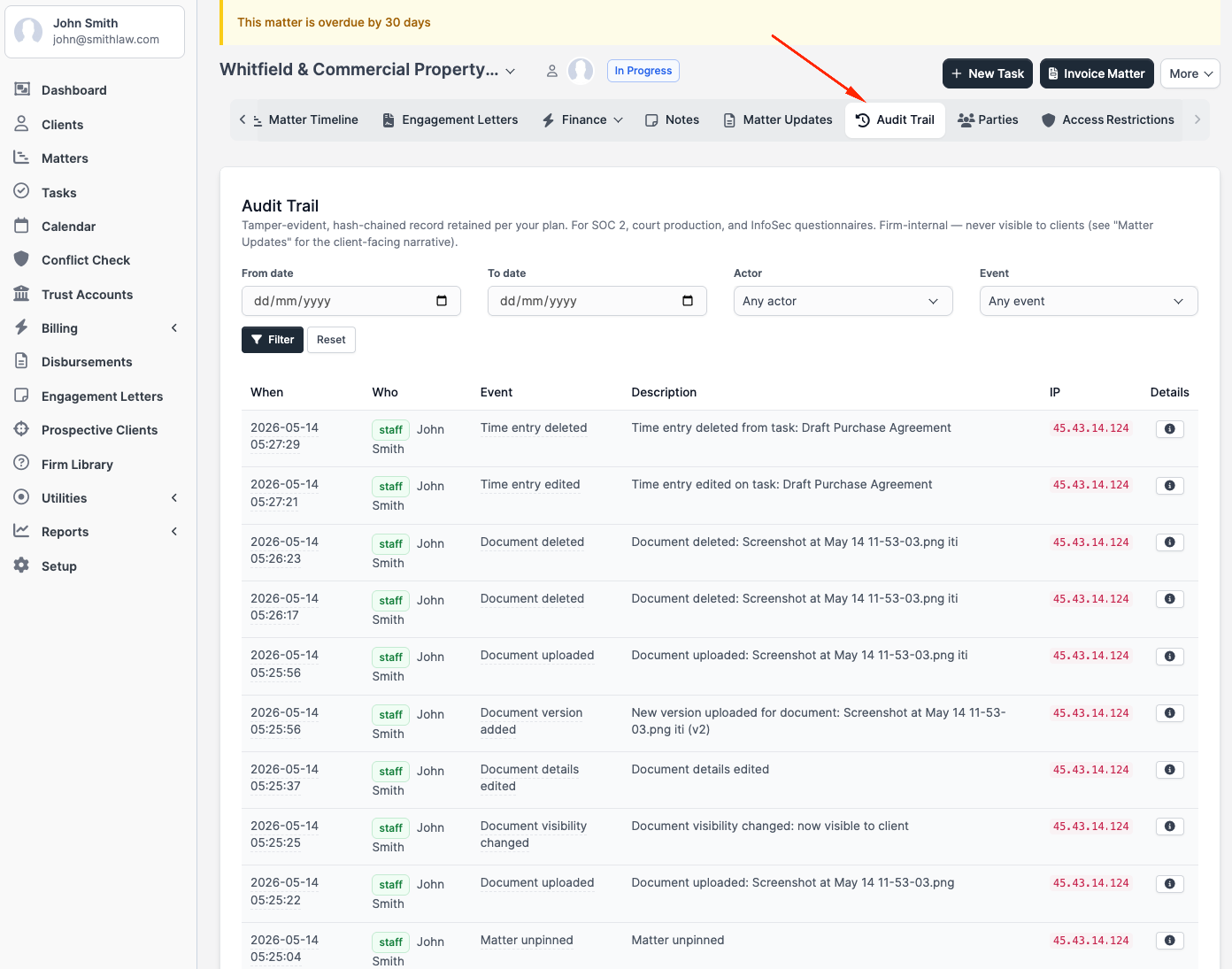
Each matter has an Audit Trail tab that shows the firm-wide audit log filtered to that one matter. This tab is separate from the Matter Updates tab, which is the client-visible narrative of progress; the Audit Trail is the compliance record and is never visible to clients. It supports bar audits and e-discovery responses that are scoped to a single matter without requiring a firm-wide export.
To open it, navigate to any matter and click the Audit Trail tab. You can filter entries by date range, actor, or event type. The tab respects any ethical-wall settings attached to that matter, so staff who are walled off from a matter cannot access its audit history through this route.
Learn more
See Per-matter audit trail for column descriptions, the complete list of events captured per matter, and how the tab interacts with ethical-wall settings.
Tamper evidence
Every entry in the audit log carries a cryptographic seal that links it to the entry recorded before it. Because each seal mathematically depends on the previous one, any later modification to any historical entry would break every seal that follows. The audit log can be verified end-to-end using industry-standard cryptographic methods.
In plain terms: if even a single character of an old record is changed, the verification fails. The proof that the log has not been tampered with is built into the log itself.
Independently certified daily timestamps (Multi-Practice and Trust Close)
For firms on Multi-Practice or the Trust Close plan, the seal at the end of each day on this activity-log chain is independently certified by a trusted third-party time-stamping authority. The separate trust-account chain is certified the same way on any plan that includes the monthly close. Two authorities are used (one primary, one fallback). These daily certificates can be verified by your forensic experts or outside counsel using standard cryptographic-timestamp verification tools, producing evidence suitable for litigation chain-of-custody.
This approach is the same one used by document-retention systems that serve financial institutions regulated by the SEC and FINRA, and is increasingly expected by enterprise legal-malpractice insurers and outside forensic firms.
Learn more
For the full mechanism, how to access the daily checkpoint viewer, what the downloadable files contain, and the OpenSSL verification workflow for your auditor or forensic expert, see Daily checkpoints.
Exports
CSV export
Available on all plans for trust events; on Growth and Multi-Practice plans for the full activity log. Each row includes its cryptographic seal so log integrity can be verified after download.
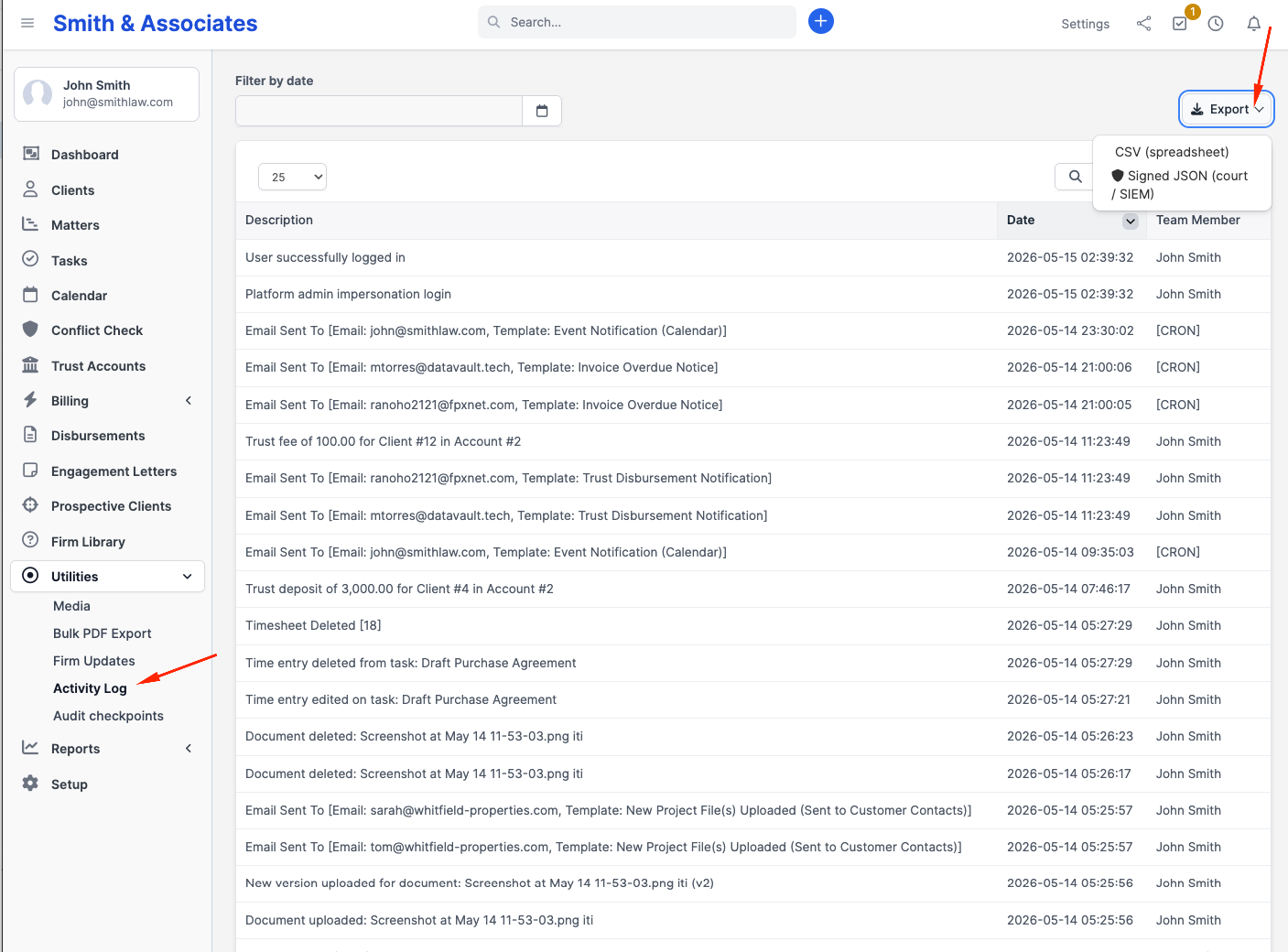
Trigger from Utilities → Activity log → Export → CSV. Exports are scoped to your firm and respect your team's access rules. Per-matter exports are not currently available from the Audit Trail tab; export from the firm-wide page and use the resource filter for matter-scoped reports.
Tamper-sealed digital export (Multi-Practice)
The export is a structured digital archive of audit entries within the filters you specify, plus a signed manifest. The manifest lists: the date range of the entries, the filter set used, the number of entries, the first and last entry identifiers, the running cryptographic seal value at the moment of export, your firm's identifier, and a separate cryptographic fingerprint of the archive itself.
Anyone who later wants to verify the export can recompute the archive's fingerprint, verify the manifest's signature against your firm's published export-signing key, and confirm that the entries have not been altered since export. This is the standard chain-of-custody pattern used in e-discovery and regulatory production. The signed-JSON export is available on the Multi-Practice plan; CSV export is available on Growth and Multi-Practice.
Forwarding to your security platform
CaseFlow can forward audit events to your firm's security platform. Two modes are available:
On-demand export. From the Activity Log page, the Export dropdown (top right) includes Signed JSON (court / SIEM) alongside CSV.
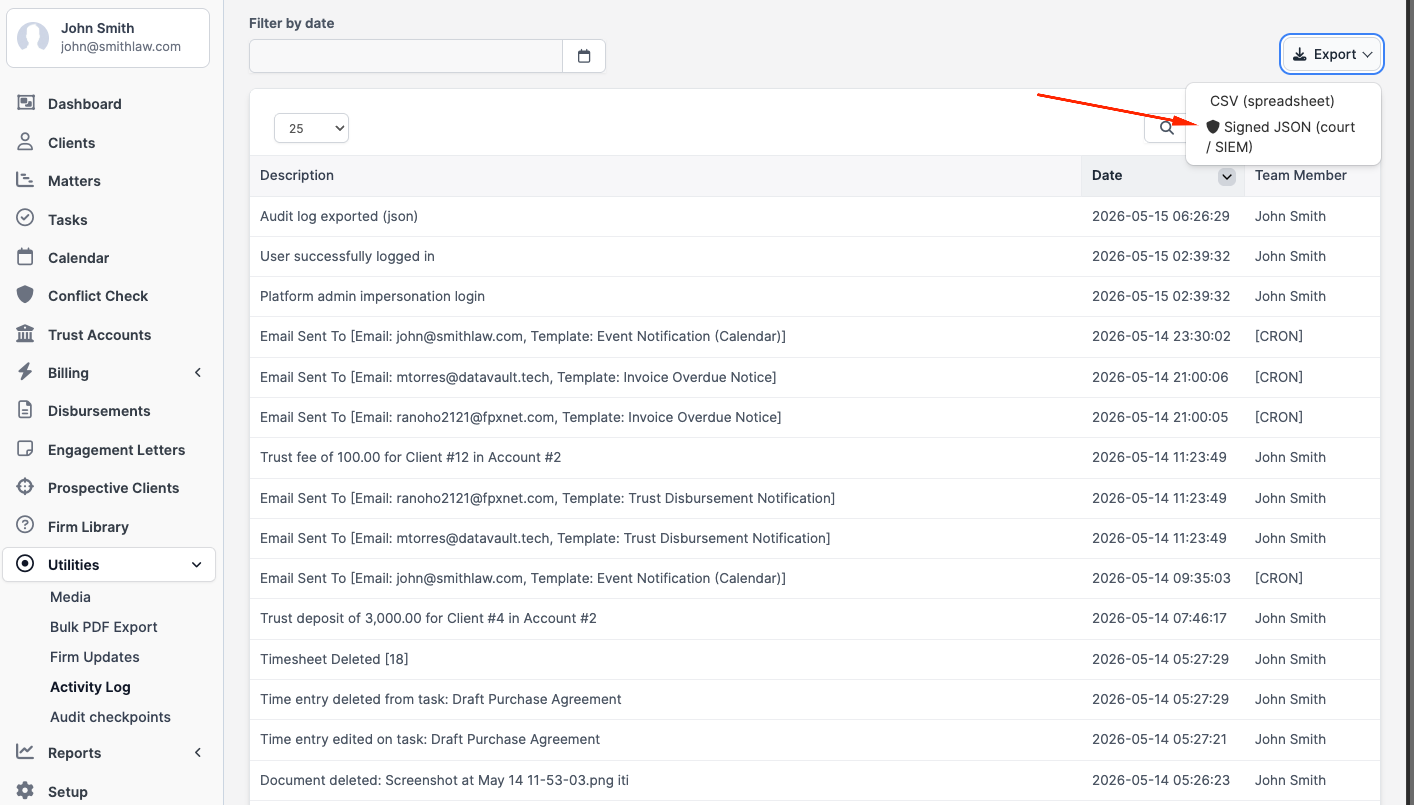
The signed-JSON file is the same artifact you would hand to a court or auditor: cryptographically sealed, includes a manifest, and can be ingested by any tool that reads JSON. Available on Multi-Practice for the full audit log; trust-only export is available on every plan via CSV.
Real-time webhook forwarding (Growth and Multi-Practice). A separate dispatcher streams every chain-anchored audit event to a customer-configured endpoint. We support:
- Splunk (via HTTP Event Collector)
- Datadog, Elastic, Microsoft Sentinel, Sumo Logic, and any system that accepts standard JSON over HTTPS, through our generic webhook
Configuration happens on the SIEM webhook settings page. Firm administrators on Growth or Multi-Practice can open it directly: append /admin/activity_log_siem to your firm's CaseFlow URL (for example, https://yourfirm.caseflow.law/admin/activity_log_siem). Only a firm administrator, signed in as themselves, can save these settings. CaseFlow support cannot.
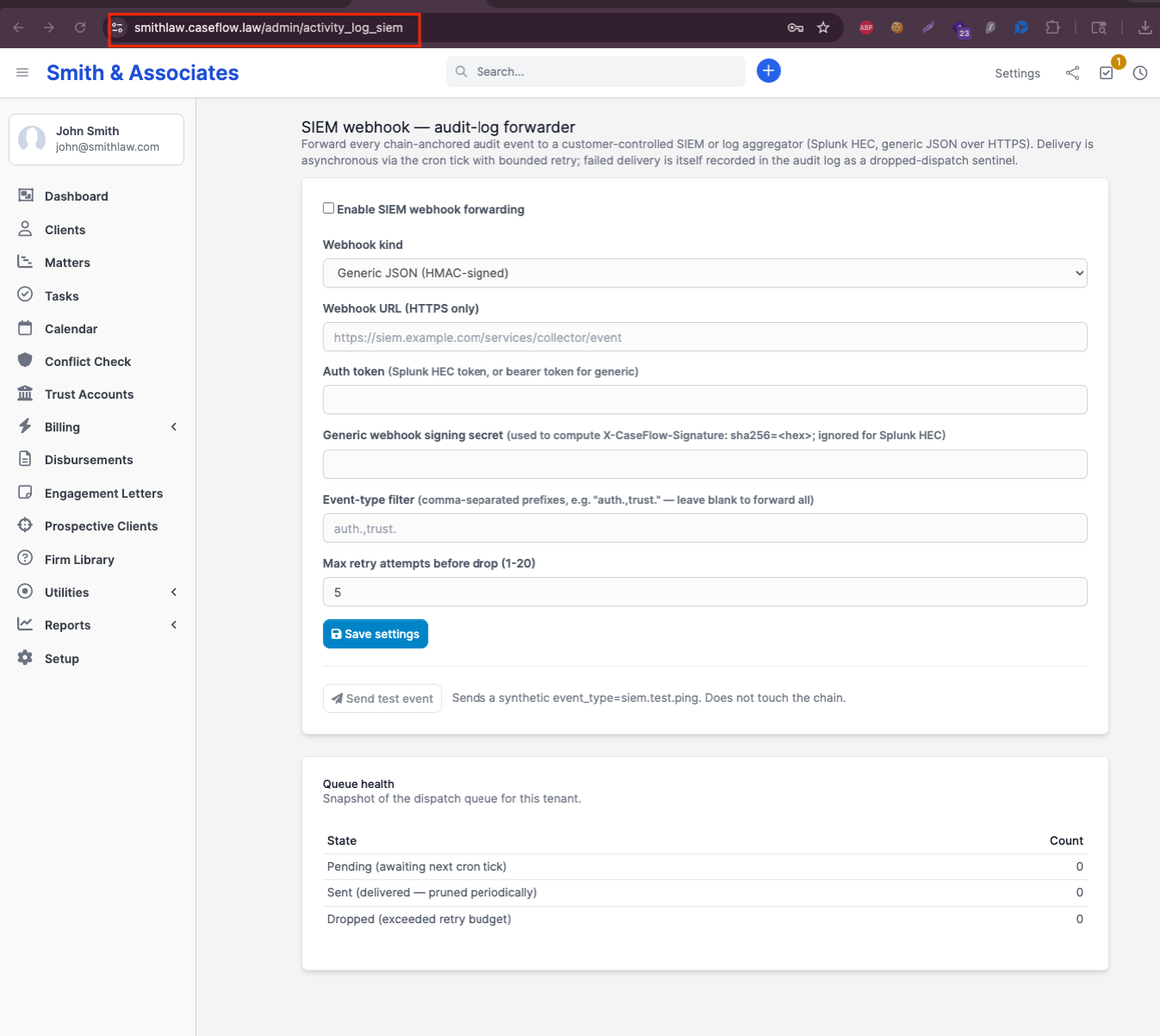
If you do not see the page or get redirected, your account is not on a plan that includes this feature, or your role does not include firm-administrator permissions.
On the settings page you choose the endpoint, the authentication, and which event types to forward. Events are buffered if your platform is briefly unavailable and retried for up to 24 hours. The page also shows a queue health table (how many events are pending, sent, or have been dropped after the retry budget was exhausted, plus the most recent ten dropped attempts with HTTP status codes), and a Send test event button that posts a synthetic ping to your endpoint without writing to the audit log itself, useful for confirming a new endpoint accepts your traffic.

This kind of native integration with enterprise security tooling is uncommon in legal practice management. Among the major platforms in this category (Clio, MyCase, PracticePanther, Smokeball, CosmoLex), none currently ship a documented native integration with Splunk, Datadog, or the other security platforms used by enterprise law firms.
Compliance mapping
| Requirement | How CaseFlow addresses it |
|---|---|
| ABA Model Rule 1.6(c), reasonable safeguards against unauthorized disclosure | Sign-in activity, document access, and exports are recorded; the log is tamper-evident |
| ABA Model Rule 1.15 + Client Trust Account Records Rule 1, complete trust records, five-plus year retention | Dedicated trust-event store, 7-year retention regardless of plan, full event detail |
| ABA Formal Opinion 477R, secure portal with an audit trail | Document and client-portal access events are captured |
| New York Rule 1.15(d), 7-year per-event retention for trust records | Trust events are retained 7 years on every plan |
| HIPAA §164.312(b), audit controls (for firms handling healthcare matters) | Sign-in, access, change, and configuration events recorded with tamper evidence |
| GDPR Article 30, records of processing (for firms with EU clients) | The log surfaces who accessed what data and when; combined with our per-firm data isolation, supports demonstration of compliance |
| SOC 2 Common Criteria CC6 and CC7, logical access and system operations | Sign-in and access-control events with structured detail; centralized logging with security-platform streaming for customer-side alerting; minimum 12-month retention on Growth and Multi-Practice |
| Cloud Security Alliance CAIQ, Logging and Monitoring domain | Tamper protection, configurable retention, restricted access to logs, audit clock synchronization, encryption in transit on exports and streaming |
| Shared Assessments SIG Lite / Core, Threat Management and Server Security | Append-only logs, configurable retention, security-platform forwarding, restricted log access |
CaseFlow does not yet hold a SOC 2 Type II attestation; our security architecture is designed to support that audit when we pursue it. We provide this audit-log specification as part of vendor-assessment due diligence; firms are welcome to share it with their IT and InfoSec teams.
What we do not do (in the spirit of calibration)
- Specialized "write-once" storage for trust events. This is required for SEC and FINRA broker-dealer records; state bars require complete records, not specifically write-once storage. We may add this for enterprise customers on request.
- Recording every read (every time a matter is opened or a document is viewed). High volume, not currently required by any InfoSec questionnaire we have seen. We can enable per-record read logging on request for matters placed under litigation hold.
- Real-time forensic search across years of logs. The current search experience handles all practical scales today and we will revisit when usage patterns warrant.
Verifying log integrity
Each entry's cryptographic seal is calculated when the entry is recorded. To verify the log end-to-end against a downloaded export, your IT or forensic team can use standard cryptographic verification tools. The verifier runs against the exported archive without requiring access to CaseFlow systems.
How CaseFlow administrators control the log
- Cannot alter or delete historical audit entries. There is no way for any user, including firm administrators, to modify or remove a recorded entry.
- Can configure retention within the plan's allowed window (for example, on Growth you can choose 3, 6, 9, or 12 months for general events; trust retention is fixed at 7 years).
- Can configure security-platform streaming (Growth and Multi-Practice). Endpoint, authentication, event filter, and retry behavior.
- Can export. CSV at any time; tamper-sealed digital export on demand on Multi-Practice.
- Cannot view another firm's events. Per-firm data isolation enforces this at the storage layer.
Contact
For specific questions about audit-log architecture, retention customization for your firm, or InfoSec questionnaire responses, contact support. Our team can join InfoSec review calls on request.