
Engagement letters
Engagement letters in CaseFlow are formal client agreements: retainers, scopes of work, fee letters, conflict-waiver letters, and any other legal document the firm wants the client to sign. You may see the older label Contracts used interchangeably in places — both refer to the same feature.
What you can do
- Draft an engagement letter with rich-text content
- Categorise by type (Retainer, Hourly, Pro Bono, etc.)
- Set start and end dates; let CaseFlow remind you (and optionally the client) before the end date
- Email the letter to selected client contacts with an optional PDF copy
- Collect a drawn e-signature in the public web view (Growth plan and above) or mark as signed manually
- Track comments, attachments, renewals, and reusable templates per letter
Engagement letters vs. proposals
Both communicate fees and scope to a client. Use whichever fits your firm's workflow:
- Legal proposals are pre-engagement: "here is what we would charge for this work; do you accept?" They convert to an invoice or fee estimate.
- Engagement letters are the binding agreement: "here are the formal terms governing our relationship." They support e-signature, expiry tracking, and renewals — proposals do not.
Many firms use both: a proposal to win the work, then an engagement letter once the client says yes. Others skip proposals entirely and go straight to the engagement letter.
Contract states
Engagement letters do not have a single "Status" enum the way proposals or invoices do. The list view groups them by computed condition:
| Summary card | What it means |
|---|---|
| Active | The end date is in the future (or empty) and the letter is not in Trash |
| Expired | The end date is in the past and the letter is not in Trash |
| About to Expire | Active, with the end date inside the firm's expiry-reminder window |
| Recently Added | Created in the last few days |
| Trash | Manually flagged as Trash; hidden from clients and stats |
In addition, two flags live on every record:
- Signed — set automatically when a client signs in the web view.
- Marked as Signed — set manually by an admin from the More menu when a paper or external signature was used.
A signed (or marked-signed) contract becomes mostly read-only: the client, project, contract value, and dates lock until you clear the signature.
Where engagement letters live
In the sidebar, click Engagement Letters. The page shows summary cards (counts by computed condition), two charts (count and value by type), and the full list table with filters.
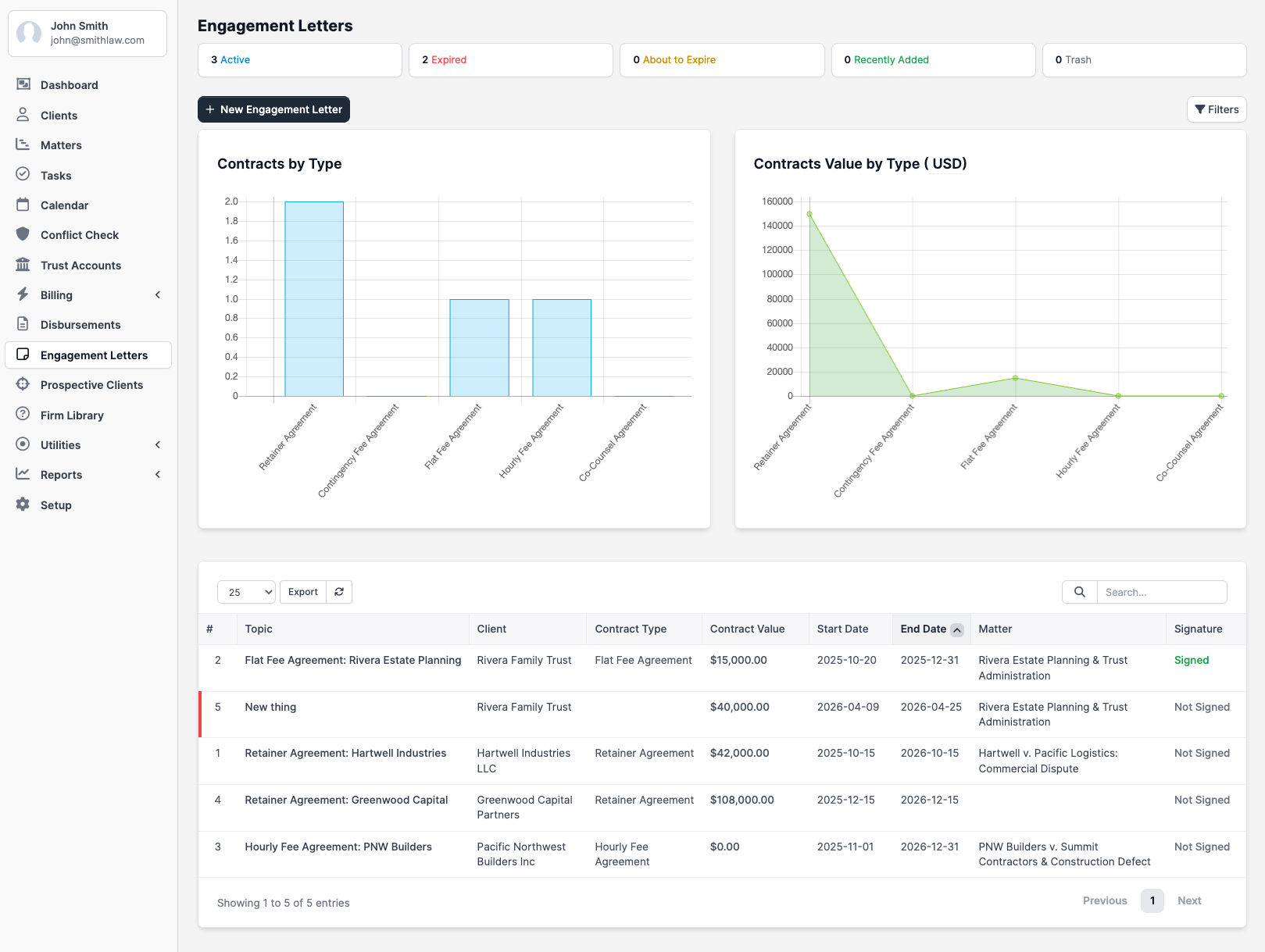
Set up your contract types under Setup > Engagement Letters > Engagement Letter Types before creating letters.
Plans and availability
Creating, sending, and tracking engagement letters is on all plans. Capturing a client e-signature in the public view requires the Growth plan or above — on Solo, the Sign action returns an "Electronic signatures are not available on this firm's current plan" message. The Mark as Signed action (for wet signatures) works on every plan.