
Data privacy
CaseFlow includes GDPR tools and data privacy controls to help your firm comply with data protection regulations.
GDPR tools
Go to Setup > GDPR to access privacy management features.
Data export (right of access)
If a client requests a copy of their data, you can generate an export:
- Go to Setup > GDPR
- Click Data Export
- Search for the client
- Click Export
CaseFlow generates a file containing all data associated with that client: contact details, matters, invoices, payments, documents, notes, and any custom field values.
Data erasure (right to be forgotten)
If a client requests deletion of their data:
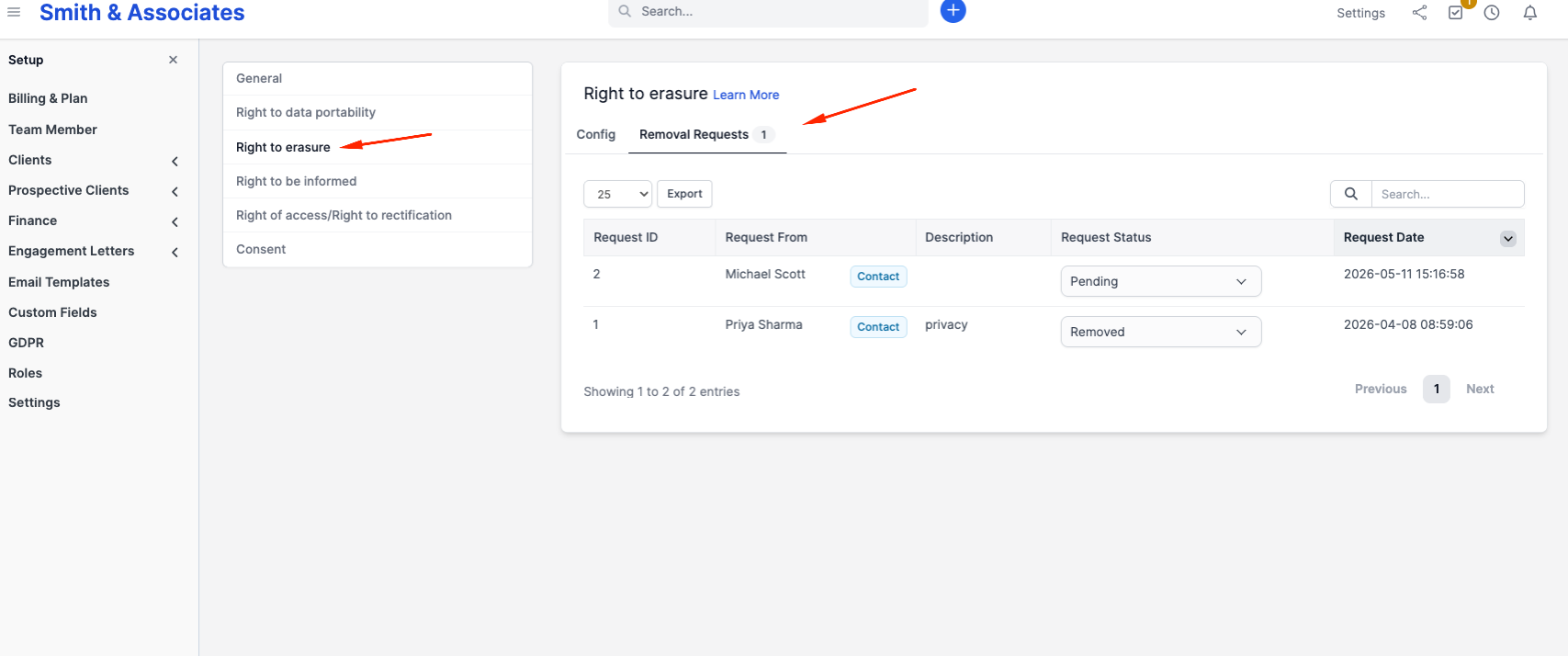
- Go to Setup > GDPR and open Right to erasure
- Under Config, choose what goes with the client: its invoices and credit notes, and its estimates
- Requests that contacts send from the client portal are listed under Removal Requests
- Delete the client from its profile
This permanently deletes the client record, contacts, and linked data. Invoices and payments may be retained for legal/tax compliance (configurable).
An invoice paid from a trust account is always kept, with its payments, even when the setting removes the client's invoices and credit notes. The trust ledger records that payment, and your bar requires trust records to be kept for a period. A credit note applied to a kept invoice, or refunded from a trust account, is kept too. What is kept still shows the client's name, billing address, items, payments, notes and attachments. The link the client was sent for any invoice or estimate of a deleted client stops working. When the setting removes invoices, a kept invoice also loses its shipping address, the client's links to its attachments stop working, and any email still scheduled about it is cancelled. Trust ledger entries are never erased. When you delete a client, or several at once, CaseFlow tells you how many invoices and credit notes it kept.
Be careful: erasure is irreversible.
Consent management
Track whether clients have consented to data processing. On client contact records, there are consent fields showing:
- Whether the contact agreed to data processing
- When they agreed
- What they agreed to
Data portability
The GDPR export generates data in a structured, machine-readable format (JSON or CSV) that can be provided to the client or transferred to another system.
What CaseFlow stores
For each client:
- Contact details (name, email, phone, address)
- Matter information
- Invoices and payment records
- Time entries
- Documents uploaded
- Communication history (emails sent)
- Notes
- Custom field values
- Portal login activity
For staff:
- Name, email, phone
- Login history
- Time entries
- Activity log
Data retention
CaseFlow does not automatically delete old data. Records stay until you remove them manually or use the GDPR erasure tool. This is intentional; law firms typically need to retain records for years (ethical obligations, statutes of limitation, malpractice insurance requirements).
Set your own retention policy and review old records periodically.
Firm data isolation
Your firm's data lives in a completely isolated workspace, separate from every other firm on the platform. There is no shared storage or pooled data. An administrator at another firm cannot see your data, and platform administrators can only see your firm's basic account information (firm name, subdomain, plan) without access to your client records.
What CaseFlow does not do
- CaseFlow does not sell or share your data with third parties
- CaseFlow does not use your data for training AI models
- CaseFlow does not serve ads based on your data
- CaseFlow support staff do not access your data unless you request debugging assistance
Brute force protection
CaseFlow limits how many times a password can be tried. After 5 attempts from one network address that do not end in a completed sign-in, with no 15-minute gap between them, sign-in from that address is paused for 15 minutes. Staff sign-in and the client portal count separately. An attempt that ends in a completed sign-in comes off the count, so signing in to your own account does not reset anyone else's; with two-step verification, that is when the code is accepted, not when the password is.
Attempts sent all at once are counted before any password is checked, so together they still get no more than 5 tries.
Two-step verification codes have a limit of their own, counted for each account rather than each address, and apart from passwords. After 5 code attempts for one account that do not end in a completed sign-in, with no 15-minute gap between them, that account's codes are refused for 15 minutes from any address, and the next code tried ends the sign-in, so whoever was guessing has to start again with the password. Only someone who already has the password reaches the code step, so the limit cannot be used to lock anyone out. A sign-in this limit stops gives its password attempt back, so a locked code never uses up the address's password attempts. Each code also signs in only once: a code that has already been used is refused.
The limit is per network address, not per account. It slows anyone guessing from one place, without letting someone elsewhere lock a Team Member or client out of their own account by typing wrong passwords for it. An address's count is deleted once 15 minutes have passed since its last attempt, the next time anyone tries to sign in.
Session security
Sessions are encrypted and configured with:
- HTTPS-only delivery (your session cookie is never sent over an unencrypted connection)
- Protection from in-browser scripts (no third-party script on a CaseFlow page can read your session cookie)
- Automatic sign-out after 30 minutes of inactivity, which your firm can set between 15 minutes and 8 hours and cannot switch off
- An unconditional 12-hour limit on any single sign-in, regardless of activity
You are warned a minute before either limit is reached, so you do not lose work you were part-way through. Staying signed in on a device you trust is capped at 7 days and requires two-factor authentication.
Automatic sign-out covers all of this in detail, including how to change it and what it means when a client asks.
When you log out, your session is destroyed server-side. You cannot log back in with an old session token.