
Risk tiers
Every conflict-check result is automatically classified into one of four risk tiers. The tier drives sort order, the colour of the row, and whether a per-result waiver button appears in the results table.
The four tiers
High risk (red)
A match against an opposing party or opposing counsel on any matter, regardless of whether that matter is currently open or closed.
What to do: do not proceed without resolution. Either decline the engagement or record a waiver with an informed-consent rationale. The result page presents a Waive button on every high-risk row.
Review required (amber)
A match that needs a partner's judgement before the firm proceeds. CaseFlow marks a result as Review required when:
- An existing client matches by exact name or by a sounds-alike (phonetic) match, or
- An existing contact matches by exact name, or
- A conflict party on some matter matches with a relevance score of 70 or higher (regardless of the party type).
What to do: open the linked client or matter, decide whether the match is the same person or entity, and either dismiss it (no waiver needed - just don't proceed if it's a real conflict) or record a waiver if you are accepting the engagement anyway.
Informational (blue)
A low-confidence partial or fuzzy match. Anything that didn't reach the thresholds above ends up here: substring matches against clients or contacts, and party matches with a relevance score below 70.
What to do: skim the rows and note anything that looks suspicious; otherwise informational results are not blockers. They do not get a Waive button because they are below the actionable threshold.
No conflict (green)
This tier appears in two situations:
- The search ran against a matter that already had a client in context, and one of the returned rows was the matter's own client or one of that client's contacts. CaseFlow demotes these so the same firm doesn't appear to "conflict with itself."
- The search came back with no matches at all - the result page shows the green "No matches found" banner instead of a table.
What to do: nothing. Move on.
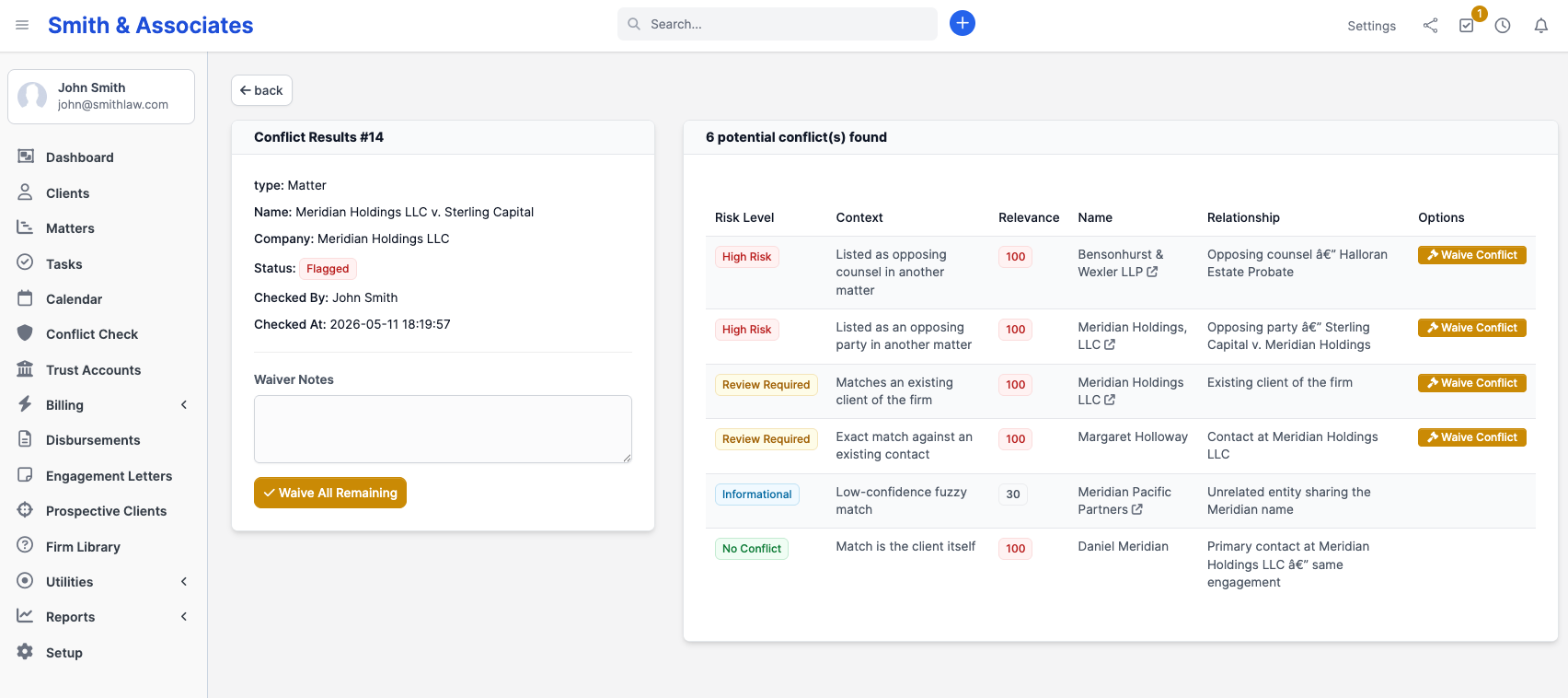
How the tier is assigned
The tier on each row is determined by three signals:
| Signal | What it does |
|---|---|
| Where the match was found (a conflict party on a matter, an existing client, or a contact) | Only party matches can reach high risk; client and contact matches cap at Review required |
| Party type when the match is on a conflict party (opposing party, opposing counsel, witness, other, client) | Only opposing party and opposing counsel produce high risk; the other party types only contribute to Review required via the score threshold |
| How the names matched (exact, phonetic, or partial) plus the relevance score | Exact and phonetic matches on clients are Review required; partial matches are Informational. Party matches need a score of 70 or higher to reach Review required |
Things that do not affect the tier:
- Matter status (active vs closed). A match on a closed matter still gets the same tier - the engine does not look at status.
- Date of the match (when the matter was opened/closed).
- Who added the conflict party.
- The outcome of any prior conflict check on the same names.
If those factors matter for your jurisdiction's ethics analysis, apply that judgement after the engine has surfaced the candidate matches. The tier is a triage signal, not a legal conclusion.
You can't override the tier
There is no "set tier to high" button on a row. If the engine's classification is too lenient for a specific situation, record a waiver anyway (the Waive button only shows on high-risk and review-required rows, but you can still document an informational match in the matter's notes or via a fresh conflict-party entry).
If the classification is too strict, that's exactly what waivers are for: see Waivers.
Jurisdictional caveat
CaseFlow's tier system is a first-pass triage. It does not replicate the analysis any jurisdiction's ethics rules require. In particular:
- Some jurisdictions extend conflicts to related parties (subsidiaries, affiliates). CaseFlow only matches what's in your party records.
- Some jurisdictions apply special rules to former clients in substantially related matters. CaseFlow does not distinguish former from current clients in tier assignment.
- Imputed-conflict rules (e.g. all attorneys in a firm share conflicts unless walled off) apply to the firm, not to the data. Use Access Restrictions on the affected matter to enforce a screen.
Treat each high-risk and review-required result as something a partner has to read and decide on. Treat informational results as a starting point for any deeper analysis your jurisdiction requires.