
Reconciliation
Reconciliation in CaseFlow is a three-way reconciliation view. The page compares two numbers that must always agree, and lets you tick off transactions as they clear the bank, while the bank statement balance itself is verified by you, side-by-side with what CaseFlow reports.
Most bar associations require monthly trust reconciliation. CaseFlow gives you the per-firm figures you need to compare against your bank statement; you (or your bookkeeper) confirm the third side of the reconciliation manually.
Opening the reconciliation page
From Trust Accounts, click the Reconciliation button on a trust account card. (The trust ledger itself does not have a Reconciliation button; return to Trust Accounts to start a reconciliation.)
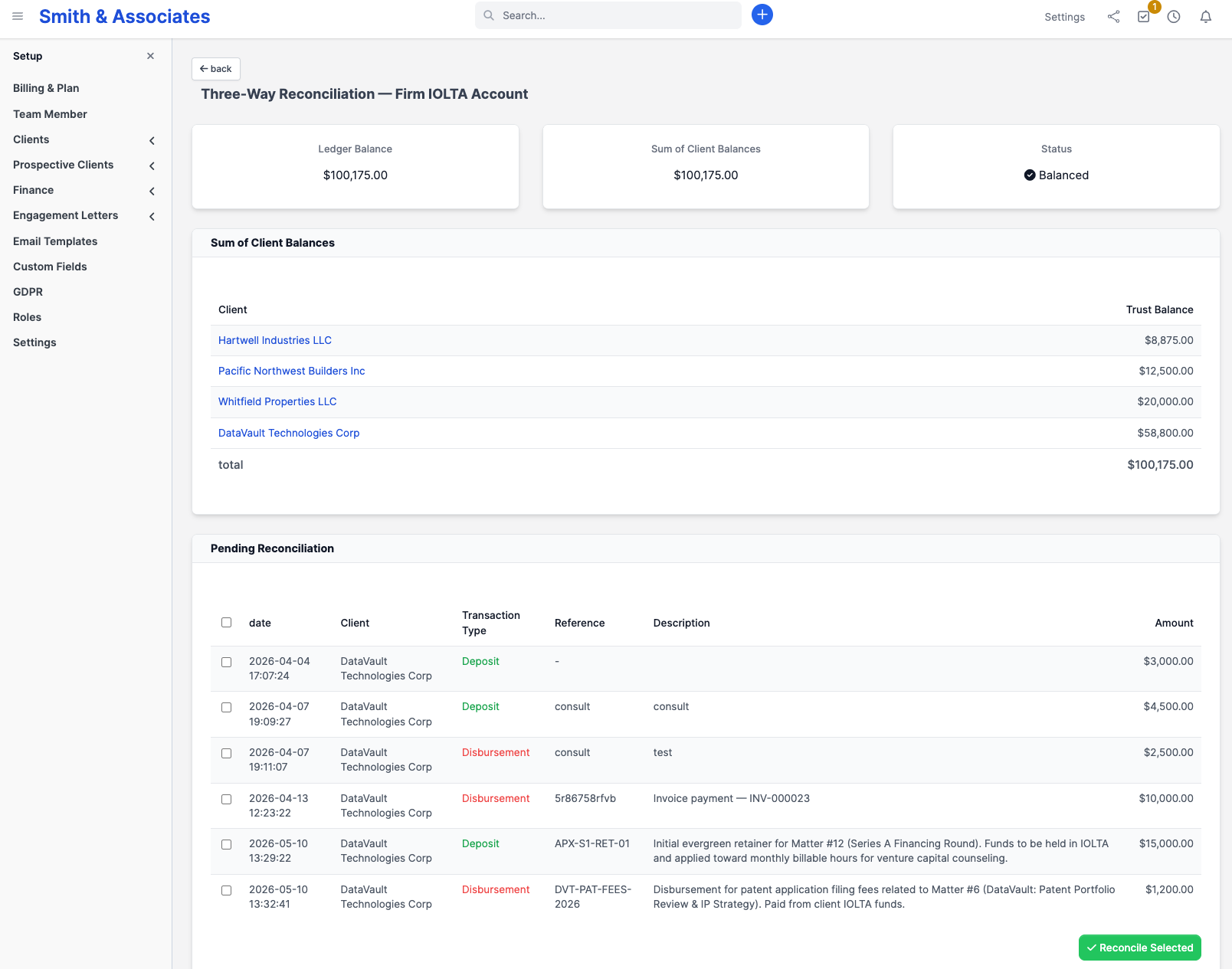
You see three summary panels:
- Ledger Balance: the sum of every recorded deposit and interest, minus every disbursement, transfer, and fee, across all clients in this account
- Sum of Client Balances: the total of each client's individual ledger balance in this account
- Status: Balanced (green tick) when the two figures agree to within a cent, or Out of Balance (red warning) with the dollar difference shown
Below the panels is a Sum of Client Balances table listing each client and their current trust balance in this account. The total on the bottom row should match the Ledger Balance figure shown above.
The third side: your bank statement
CaseFlow does not import or hold a bank-statement balance. To complete a three-way reconciliation:
- Open the bank statement for the period you are reconciling.
- Compare the closing bank balance against CaseFlow's Ledger Balance panel.
- Compare CaseFlow's Ledger Balance against the Sum of Client Balances.
When all three figures (bank statement closing balance, CaseFlow ledger balance, sum of client balances) agree, the account is reconciled for that period.
If your jurisdiction requires you to attach the worksheet, generate trust statements (Trust statements) for the period and pair them with the printed bank statement.
Marking transactions as bank-cleared
The Pending Reconciliation table at the bottom of the page lists every trust transaction that has not yet been ticked off as bank-cleared. Each row shows date, client, transaction type, reference, description, and amount.
For each transaction that appears on the current bank statement:
- Tick the checkbox in the leftmost column. The header checkbox toggles all rows at once.
- Click Reconcile Selected at the bottom right.
Ticked transactions are flagged as reconciled (with a timestamp and the staff member who marked them) and disappear from this list. Transactions that have not yet cleared the bank, such as outstanding cheques or in-flight wires, stay in the Pending Reconciliation list and roll forward to next month.
When every transaction in the period has cleared, the page shows All transactions have been reconciled.
When the figures do not match
If the Ledger Balance and Sum of Client Balances disagree, something has corrupted the per-client tracking. This should never happen under normal use; investigate immediately:
- Look for transactions where the client field is blank or set to a deactivated/deleted client
- Confirm no records were modified outside CaseFlow's standard UI
- Contact support if the cause is not obvious
If the bank statement disagrees with the Ledger Balance, the cause is usually one of:
- Missing transaction in CaseFlow: A deposit or disbursement happened at the bank but was never recorded. Add the missing entry; the ledger balance will adjust.
- Outstanding transaction: You recorded something that has not yet cleared the bank (e.g. a cheque that is still in transit). Leave it unticked in the Pending Reconciliation list; it will clear in a later period.
- Wrong amount: A transaction was recorded with the wrong dollar value. Trust transactions cannot be edited; post a reversing entry, then re-enter at the correct amount (see Editing and deleting transactions).
- Bank fee or interest the bank applied that you have not yet recorded in CaseFlow. Record interest credits and bank fees as separate trust ledger entries before completing the reconciliation; see Posting interest and Recording a bank fee.
How often
Reconcile monthly at minimum; many bars require it as a hard rule. Firms with active trust accounts often reconcile weekly. The longer you wait between reconciliations, the harder it is to find a discrepancy, and the higher the risk of compounding errors.
Learn more
Reconciliations are recorded in the Trust audit trail, including who reconciled, on what date, and which transactions were marked cleared. Bar examiners look for a consistent reconciliation cadence (monthly at minimum) and use the trust audit log to verify it.