
Conflict checking
The conflict-check engine searches your firm's clients, contacts, and per-matter conflict parties for matches against a name or company you are about to take on. Each match is automatically classified into a risk tier so a partner can see the most actionable rows first.
Plan requirement
Conflict checking and access restrictions are on the Multi-Practice plan. On Solo and Growth the sidebar entry shows a lock icon and clicking it lands on the upgrade page.
What you can do
- Search by name and/or company across clients, contacts, and matter conflict parties
- See each match with its risk tier, risk reason, and a relevance score (0-100)
- Maintain a per-matter list of conflict parties (clients, opposing parties, opposing counsel, witnesses, others) that future checks compare against
- Record a waiver on any individual high-risk or review-required result, with a structured reason and free-text notes
- Set access restrictions (ethical walls) on individual matters to block specific staff members from seeing a matter even when they have firm-wide access
- View the firm's full conflict-check history with date, who ran it, and the recorded status
Why it matters
Bar ethics rules require a documented conflict check before taking on a new client or matter. Missing a conflict can lead to malpractice exposure, disqualification motions, and disciplinary action.
CaseFlow does not run the check for you automatically; you initiate each search. Every check is logged, including ones that return no matches, so the audit trail shows that the firm asked the question.
Where conflict checking lives
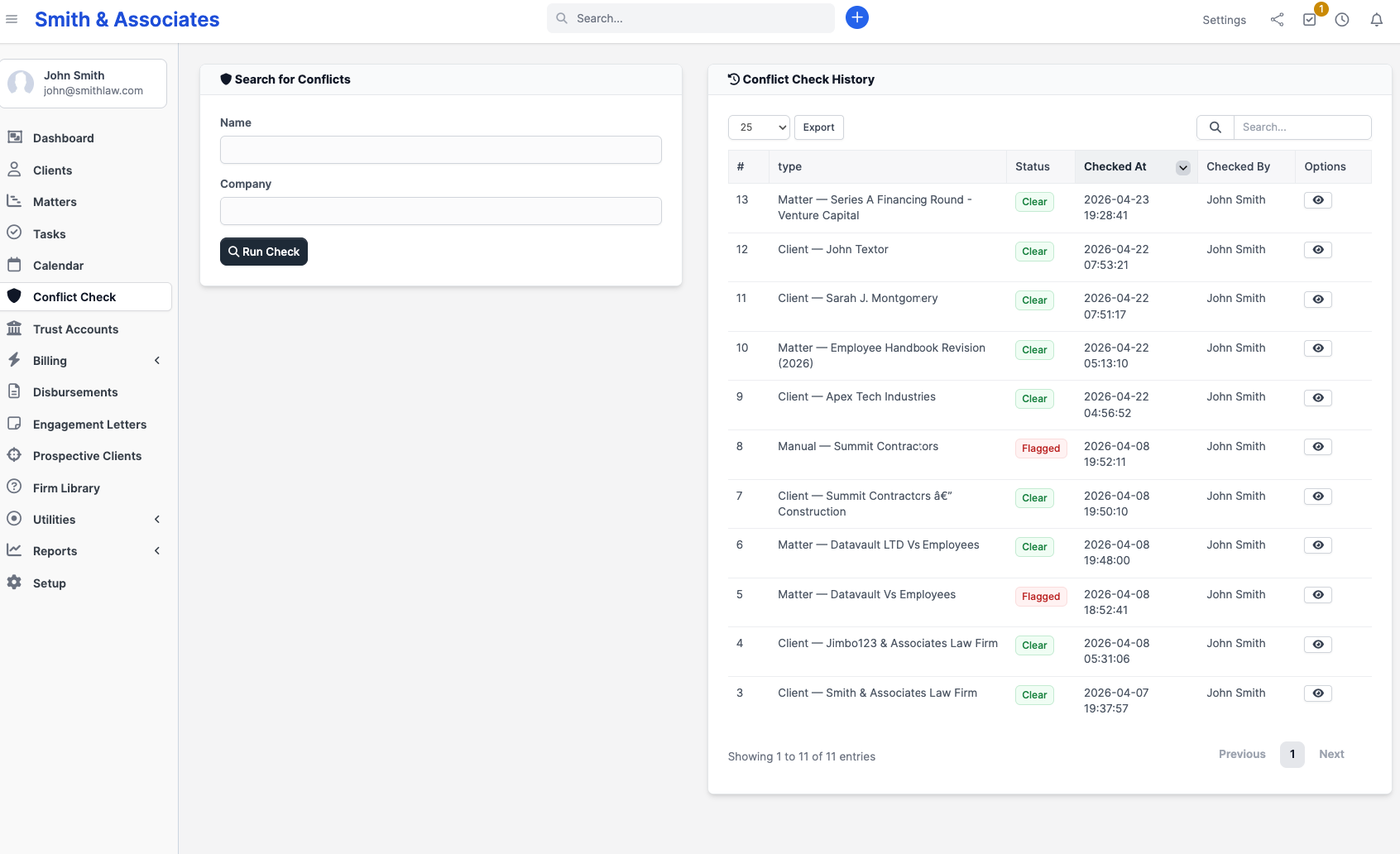
In the sidebar, click Conflict Check. The page has the search form on the left and a history table on the right with every prior check (number, type, status, who ran it, when, and a link into the results).
To curate the per-matter conflict-party list (the data the engine searches against), open a matter and use the Conflict Parties tab. To impose access restrictions on a specific matter, open the matter and use the Access Restrictions tab.
What's a conflict party?
Each matter keeps its own list of people and entities that count as parties to the engagement. The party types in CaseFlow are:
- Client (added automatically when you create the matter)
- Opposing party
- Opposing counsel
- Witness
- Other (catch-all for relevant third parties)
A match against a party flagged as Opposing party or Opposing counsel is automatically a high-risk result. The other party types, and matches against your existing clients or contacts, produce review-required or informational results depending on how closely the names line up.
If you do not maintain conflict parties on your matters, the engine still searches clients and contacts, but it will miss adverse-interest conflicts. Treat the per-matter party list as part of intake, not optional metadata.
Plans and availability
| Feature | Plan |
|---|---|
| Run a conflict check, view results, record waivers, build per-matter party lists | Multi-Practice |
| Access restrictions on matters (ethical walls) | Multi-Practice |
Both ship together on the Multi-Practice tier.