
Per-matter audit trail
Plan availability
Available on Growth and Multi-Practice plans. The tab is not present on Solo plans.
What this tab shows
Every matter in CaseFlow has an Audit Trail tab. It shows the firm's compliance log filtered to events on that one matter: who took an action, when, from which IP address, and what changed. The record is tamper-evident and is never visible to client contacts. 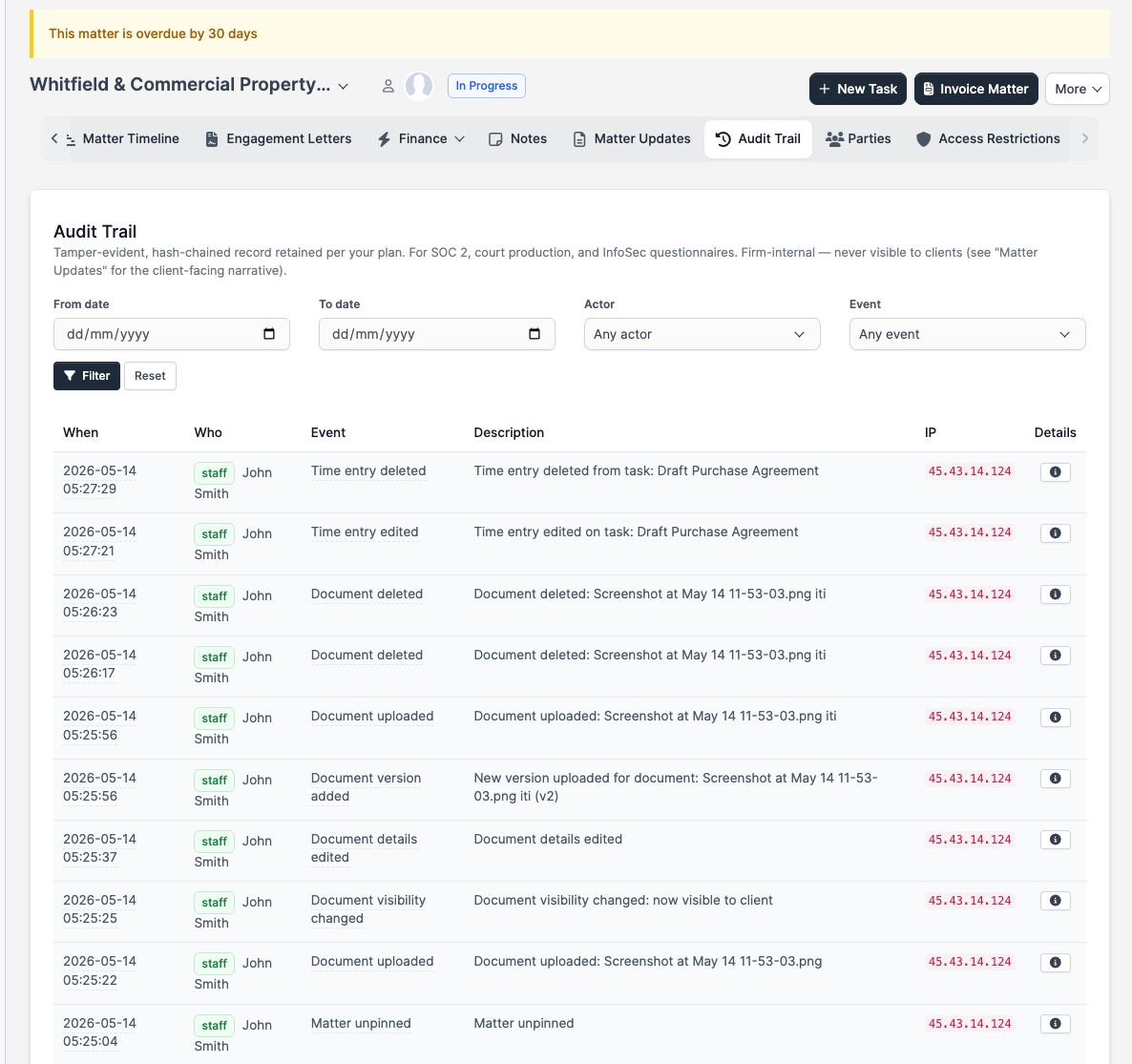
The tab displays up to 200 of the most recent events matching your filters. If the matter has a long history, narrow the date range or use the firm-wide export to retrieve older entries.
How it differs from Matter Updates
| Tab | Purpose | Client-visible? |
|---|---|---|
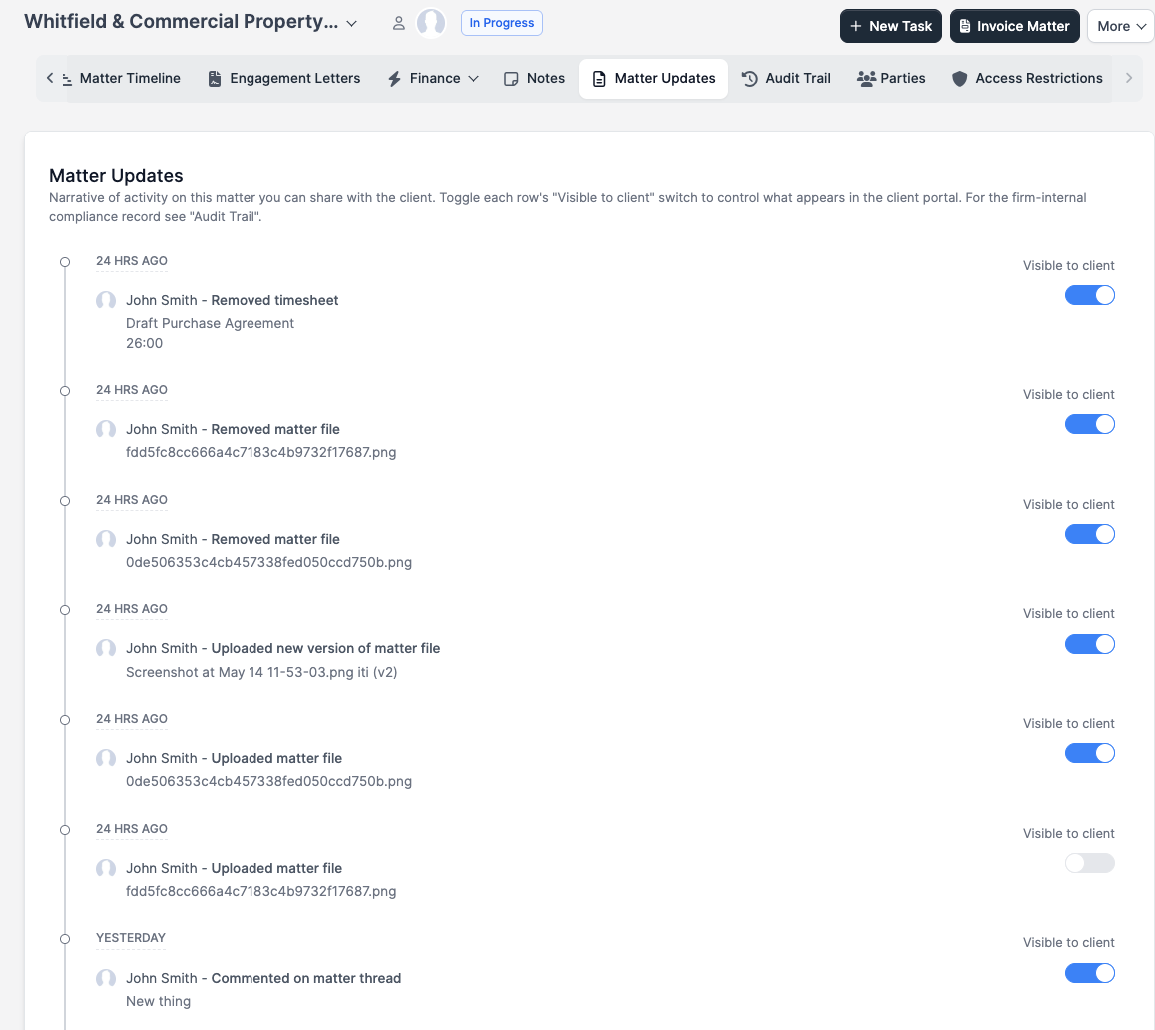
| Matter Updates | Narrative timeline of activity on the matter. Each entry can be toggled visible or hidden from the client portal. Used for client communication and relationship management. | Optionally yes |
| Audit Trail | Compliance and oversight record. Tamper-evident, IP-captured, hash-chained. Used for bar audits, e-discovery, InfoSec questionnaires, and internal oversight. | Never |
Where to find it
Open any matter and click the Audit Trail tab in the matter tab bar, alongside Overview, Matter Updates, Tasks, and the other matter sections. The tab appears only when your firm is on a Growth or Multi-Practice plan.
Columns
Each row in the table records one discrete event. The six columns are:
| Column | What it tells you |
|---|---|
| When | Date and time of the event. Hover the value to see the full UTC timestamp. |
| Who | Name of the person or process that triggered the event, with a colored type badge: staff member, client contact, system, or automated process. |
| Event | Human-readable label for what happened (for example, "Document uploaded" or "Key deadline added"). Hover the label to see the underlying event identifier used in exports and security-platform streaming. |
| Description | Structured summary of the action, such as the specific field changed or the name of the record affected. |
| IP | Originating IP address of the request. |
| Details | Click the expand icon to see the browser or client user agent and any structured before/after change data recorded for the event. Rows with no additional metadata show a dash. |
Filters
Three filter controls appear at the top of the tab. From date and To date narrow the results to a specific date range. The Actor dropdown lists every staff member and client contact who has an event in this matter's log. The Event dropdown lists every distinct event type that has appeared on this matter. Apply any combination and click Filter; click Reset to clear all filters.
What's logged
| Event | What it captures |
|---|---|
| Matter created, edited, status changed, finished, copied, deleted | The actor, timestamp, IP, and for edits, the before and after values of changed fields |
| Matter viewed | Who opened the matter and when, captured for high-sensitivity matter access auditing |
| Matter pinned or unpinned | Personal pinning preferences for staff dashboards |
| Key deadline added, updated, removed | Which key deadline was affected and what changed |
| Document uploaded, version added, edited, externally linked, visibility changed, deleted | File name, who took the action, and whether client-portal visibility was toggled |
| Note added, edited, deleted | Which internal note was affected |
| Discussion created, edited, deleted | Internal team discussion threads on the matter |
| Comment added on a discussion | Replies and updates to discussion threads |
| Bulk task completion | Closing several matter tasks at once |
| Invoice issued against the matter | Billing actions tied to the matter |
| Team member added or removed | Which staff member joined or left the matter team |
| Matter Updates entry visibility toggled | An entry on the client-facing Matter Updates tab was shown or hidden from the client portal |
Ethical walls
The audit trail respects matter-level access restrictions. A staff member who is walled off from a matter cannot see its audit trail, even if they have general matter-view permission. This applies regardless of their role or plan tier.
Learn more
For the firm-wide audit log across every matter and every event category, see Audit log. For the trust-account compliance record, see Trust audit trail.